
Quantify Copilot benefits using your readiness assessment findings
Table of contents
Key takeaways:
- Copilot’s real value comes from aligning AI with your specific workflows and actual usage data.
- Pristine data and strong governance improve Copilot outputs far more than AI can manage alone.
- Incremental rollout and targeted training helps teams maximize Copilot’s potential.
- Analyze user feedback and pilot results to refine use cases before full-scale deployment.
- Syskit Point’s centralized governance and automation help maintain continual data hygiene, so your Copilot investment stays protected for the long haul.
A Copilot business case comes down to proving that your own tenant data and workflows justify spending $30 per user, per month. This naturally requires more than personal instinct, needing a data-led case that’s wholly based on your own company stats and workflows.
This guide provides you with a clear, quantifiable framework to convert readiness assessment findings into a business case-ready ROI model, grounded in real usage. You’ll see how to calculate Copilot’s worthiness for your own business, and make guesswork a thing of the past.
From readiness assessment to value assessment
A readiness assessment and a value assessment serve two different purposes when considering Microsoft 365 Copilot adoption:
The readiness assessment asks: “Can we deploy Copilot safely and effectively?”
It’s a technical audit, focused on permissions, data hygiene, and licensing eligibility. This step uncovers whether your teams have clean SharePoint sites, clear ownership of files, and access controls that actually match your intended business structure. It identifies technical blockers, like messy data, excessive sharing, or user roles that would either undermine Copilot’s value or cause unintentional data exposure.
A value assessment is a business case question: “Should we deploy Copilot, and where will it yield the most return?”
This assessment uses data to describe where your environment is optimized or chaotic. The goal is to pinpoint which teams or departments have the greatest ‘Copilot readiness’. Those with organized data, clear user permissions, and a defined set of high-volume, repeatable workflows stand to gain the most.
The link between these assessments is clear:
What you find in your readiness assessment either accelerates or limits your ability to deliver on the ROI you promised.
A team with clean file structures and careful permissions can expect Copilot to provide relevant, reliable answers immediately, leading to early wins and clear indicators of value for money. On the flip side, if you uncover permission sprawl and data chaos, Copilot can easily result in confusion, misplaced data surfaced as ‘insights’, and wasted licensing spend.
“The readiness assessment is the essential data source for a value assessment that will stand up to board-level scrutiny. If your audit uncovers disorder, your business case for Copilot needs to start with cleanup. But if your data is in shape, you can then quantify where Copilot will drive real gains for your business.”
– Danijel Cizek, Product Manager Team Lead at Syskit
Step 1: Identify your pilot users and use cases
Selecting pilot users and use cases for Copilot should start with your Microsoft 365 tenant data. Begin by analyzing usage reports and audit logs. Who are the actual power users of Teams, Outlook, Word, and Excel?
Look for individuals and departments with high activity, frequent document creation, and established routines in well-governed SharePoint sites. These groups are best positioned to extract immediate value from Copilot.
Here’s how to map roles to high-value workflows:
- Sales teams: Prioritize users who handle frequent follow-ups and client meetings. Let Copilot assist in drafting emails, summarizing Teams calls, and preparing call scripts.
- HR professionals: Turn long policy documents into short, role‑specific summaries or FAQs that are easier for employees and managers to understand and follow.
- Finance users: Pick analysts and accountants dealing with large data sets. Use Copilot to automate Excel analysis, narrate financial reports, and summarize quarterly earnings calls.
Start with these major business roles, and you’ll reduce training time and be able to quantify Copilot’s use much faster. Experienced users in structured environments are the most likely to grasp Copilot’s strengths quickly, supply useful feedback, and showcase value across the organization.
Pilot selection is all about maximizing impact. By targeting productive, tech-savvy teams operating in clean, accessible data environments, you set the table for rapid ROI.
Step 2: Calculate the ROI
Calculating Copilot’s ROI accurately comes from checking actual usage data. Start by listing repetitive tasks where Copilot excels, then assign conservative savings for each.
Here are a few typical industry examples to consider for starters:
- Email triage and summarization: 10-15 minutes shaved off per day for every power user, thanks to automated sorting and one-click recaps.
- Meeting recaps and action items: 15-20 minutes saved per meeting, with Copilot’s instant transcript summary and action point extraction.
- First draft creation for reports and presentations: 30+ minutes saved per document, with Copilot handling the heavy lifting on structure and content.
Take a standard cost of an employee – say, $60/hour. The Copilot license costs $30/month. That means saving just 30 minutes a month covers the license. If Copilot claws back an hour per week, then the productivity surplus supersedes license costs, generating real financial value.
🔥 Here’s a hot tip! Don’t count productivity boosts from features already bundled with your existing Microsoft 365 license, as those won’t help you justify the Copilot add-on. Focus on Copilot-specific capabilities to ensure your ROI case stands up to scrutiny.
Step 3: Build a defensible case by addressing the risks
Copilot’s accuracy, security, and value timeline are genuine concerns for any leadership team, and they should be front and center of your deployment plan.
Accuracy depends on your M365 environment. When SharePoint sites are clean and file permissions are tight, Copilot surfaces reliable information. But data sprawl and outdated documentation reduce accuracy, making users more likely to ‘blame the bot’ for errors that stem from old or confusing sources. This is a real risk, especially in large tenants.
Security is a slightly easier objection to handle. Unlike consumer AI chatbots, Microsoft 365 Copilot respects all tenant-level security boundaries, existing permissions, and DLP policies.
Data governance platforms and Microsoft Purview support rigorous auditing and compliance controls throughout a Copilot rollout, further reducing risk.
Timeline expectations matter just as much, so don’t let the promise of AI-driven productivity create false urgency. Industry experience points to a realistic schedule – allow 3-6 months for data cleanup and permission remediation before Copilot goes live, and longer if your tenant, user, and file counts are high.
After setup, run a pilot phase with active monitoring, tracking adoption, accuracy, and risk. Use these results to refine your controls and prove the platform’s credibility before full deployment.
By acknowledging these risks and addressing each one with concrete mitigation plans, you’ll turn the tables on objections, presenting a path to practical results.
Step 4: Power your business case with Syskit Point
Calculating the initial ROI is just one part of the process. The financial case for Copilot is quickly undermined by a security breach, or gradually weakened if users lose trust in the platform’s value.
Syskit Point is the essential shield to protect and power your investment in Copilot. As a centralized governance platform for Microsoft 365, Syskit Point continuously hunts down overshared links, risky permissions, and unnoticed guest sprawl.
Automated reviews let you fix any vulnerabilities before Copilot even sees them, making breaches far less likely. With clear inventory and actionable dashboards, Syskit gives you complete control.
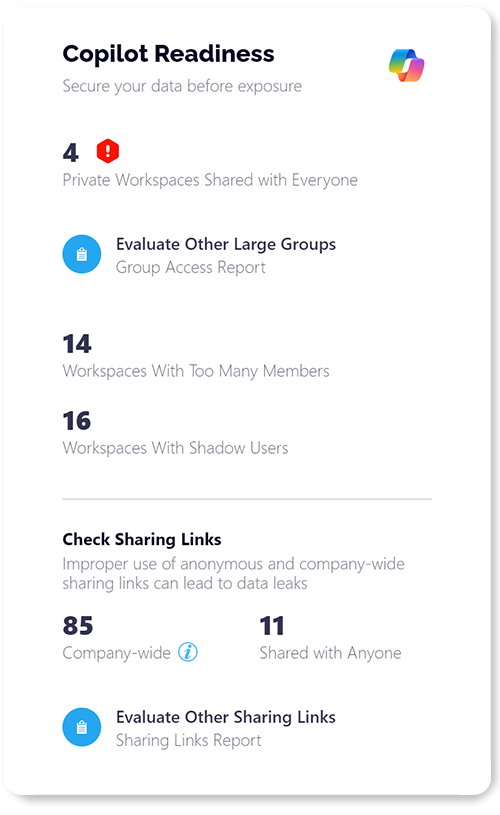
Copilot’s value is wholly dependent on having clean, organized data – without it, users are unlikely to see its value. Syskit Point’s ongoing governance, including automated workspace reviews and delegated cleanup tasks for owners, ensures your environment stays healthy over time.
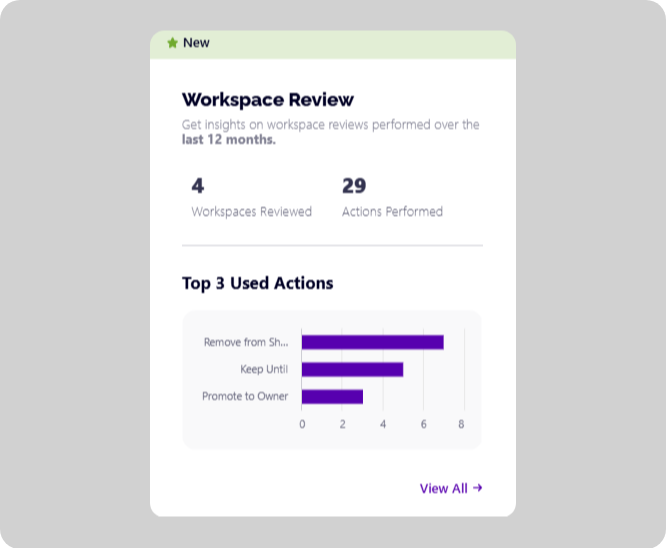
And when leadership or auditors ask for proof that your AI deployment remains secure and compliant, Syskit Point has everything covered! Automated reports track access reviews, document lifecycle management, and permission changes, supporting regulatory needs and enterprise-grade audits without the need for manual effort.
Syskit Point delivers a foundation that promotes user adoption and much, much more, enabling those building a business case for Copilot to deliver a rock-solid ROI to those holding the purse strings.
▶️ For an in-depth visual guide to assessment, preparation, and management, check out our video on Securing and Governing Microsoft Copilot.
Your framework for proving and protecting Copilot’s value
Proving Copilot’s value combines technical diligence with strategic pilot selection, honest ROI tracking, and ongoing governance.
Your business case needs a foundation built on data, so follow our implementation checklist for a successful rollout:
- Conduct a readiness assessment to surface risks and opportunities.
- Select a pilot group using real Microsoft 365 usage data.
- Set baseline metrics for time spent on repetitive tasks and document creation.
- Launch a 3-month pilot with focused training and collect feedback.
- Install automated governance to continually review permissions, data hygiene, and workspace sprawl after launch.
- When adoption data confirms real, persistent savings, take your ROI evidence to leadership to justify expansion.
Adopt this approach and you’ll build a business case that fits into your own environment and workflows. You’ll be reporting on your own genuine user data, rather than having to conjure up a theoretical case for Copilot adoption.
Keep your environment secure, compliant, and primed for Copilot by trying Syskit Point today.