SharePoint sprawl and the simple governance fix your tenant needs
Table of contents
TL;DR
SharePoint sprawl is the uncontrolled growth of sites, groups, and content that happens when workspace creation races ahead of active governance. Stopping sprawl requires managed provisioning so every new workspace has a purpose, owner, and expiration date. Syskit Point provides the centralized inventory and automated owner reviews needed to run this operating model at scale – from a single dashboard.
Every time someone spins up a new Team, shared channel, Planner plan, or Viva Engage community, another SharePoint site quietly appears in the background. Sprawl is simply a by-product of how Microsoft 365 is wired, and a challenge to recognize and manage.
Potential outcomes of sprawl include extra storage costs, security risks through stale permissions, and Copilot chaos, with AI surfacing ROT (Redundant, Obsolete, Trivial) data. Managed poorly, this creates time-consuming manual workloads, rarely fixed by scheduling a heroic cleanup every year.
The best fix comes from taking control of day-to-day SharePoint by centralizing visibility and automating reviews to workspace owners. Let’s take a look at SharePoint sprawl in detail and how platforms like Syskit Point provide all the answers you need.
Why sprawl happens (and why lockdowns fail)
As we’ve seen, sprawl is a natural by-product of using SharePoint – if anyone can create a Team or site, growth explodes:
- Create a new Microsoft Team = Triggers a new SharePoint Team site.
- Create a new Private Channel = Triggers a separate SharePoint site.
- New Microsoft 365 Group = Triggers a new SharePoint Team site.
Some admins lock SharePoint down in an attempt to manage sprawl, but this rarely solves the problem. Employees still need a workable platform, and if they can’t access SharePoint, many will use third-party tools and storage. Instead of SharePoint sprawl, you get ‘shadow IT’ – work being invisible and untrackable.
User behavior naturally accelerates sprawl. When people can’t find what they need, they may assume the old site is broken and spin up a new one instead. Every new site leaves another half-used site behind.
Copilot adds further complexities. Because it draws on whatever your tenant makes available, it treats abandoned sites, outdated drafts, and long-forgotten project spaces as valid input. This is how you end up with answers quoting legacy policies, old contract versions, or retired project names as if they were current.
This is Copilot simply doing what it was invented for – reflecting the content and structure of your SharePoint estate, including all the clutter. But a lack of careful management can lead to security risks, because quiet, orphaned sites with lingering guest access are the easiest place for oversharing and data leaks to hide.
The three pillars that fix SharePoint sprawl
Fixing SharePoint sprawl comes down to three pillars – how sites are created, how they age, and who owns the decisions:
Pillar 1: Managed provisioning
Move from Anyone can create to Anyone can request. New workspaces should always have three things: a clear purpose, a named owner, and an initial review/expiration date. This alone cuts out test sites, duplicates, and one-off projects that never had a plan.
In practice, this means limiting who can create new sites and Teams (for example, to a security group) and giving everyone else a simple request path instead of a blank ‘Create’ button.
Consistent naming conventions ([DEPT]-[PROJECT]-[YEAR]) also allow Copilot and users to distinguish between active hubs and stale archives. When you encode purpose and scope into the name, admins and users can see what a site is for at a glance and avoid spinning up near-identical workspaces.
Pillar 2: Active lifecycle policies
Every workspace should have an expected end date. Lifecycle policies enforce that end in a predictable way, instead of waiting for IT to notice old sites years later. Remind yourself of the difference between archiving and deletion, and use these correctly:
- Archiving means the site becomes read-only, retained for reference, audits, or records.
- Deletion is permanent removal after retention requirements are met.
Pillar 3: Distributed accountability
IT cannot reasonably review thousands of sites and guess which aren’t needed. They also don’t own the processes, customers, or projects inside those sites. The fix is to shift the decision-making to Site Owners.
“On a recurring schedule, owners confirm that their workspace is still needed, its membership is accurate, and its purpose still makes sense. If a workspace is confirmed as no longer required, the lifecycle policy kicks in – archive or delete.”
–Danijel Čižek, Product Manager Team Lead at Syskit
This distributed review model scales with your tenant. As your environment grows to 5,000 or 10,000+ sites, the number of people doing the cleaning grows automatically.
Native Microsoft 365 tools: What’s in the box?
Microsoft 365 ships with a few solid tools for keeping workspaces under control:
- Microsoft 365 Group expiration policies let you set a lifetime for groups, such as 180 days. When a group hits that limit, and no owner renews it, the group and its connected resources (including the SharePoint site and Team) are soft-deleted and recoverable for about 30 days before permanent deletion. It’s a good safety net for obviously inactive collaboration spaces.
- Purview retention gives you a different set of controls. Retention policies apply to entire locations, such as a SharePoint site, and stop content from being deleted before its time. Retention labels apply to individual items and can override those broader policies. This is great for records, but it can create additional sprawl. One document with a long retention label can keep an entire site hanging around, even when the workspace is otherwise ready to go.
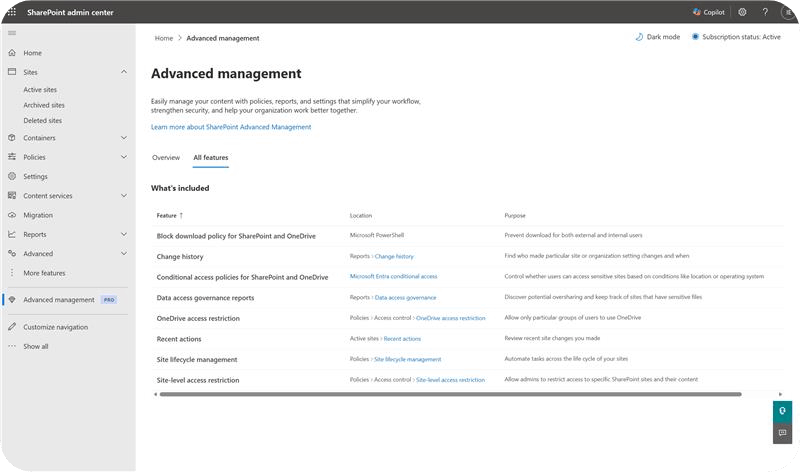
- SharePoint Advanced Management (SAM) adds further governance. You get site lifecycle policies that can flag inactive or orphaned sites, plus Data Access Governance (DAG) reports that highlight oversharing and risky access patterns for specific sites. Look into licensing before you commit – although many SAM capabilities needed for Copilot readiness are now included when your tenant has Copilot licenses, some controls (like restricted site creation) still require the standalone SAM add-on.
It is, however, worth knowing that native reports are often point-in-time snapshots, can lag by a day or two, and usually live in different admin centers. IT admins can find themselves jumping between Teams, Entra, SharePoint, and Microsoft Purview to piece together a story and then run separate scripts or clicks to take action.
Implementing the “Distributed Governance” model
Distributed governance works when ownership is clear, reviews are regular, and decisions live with the people closest to the work.
Start with ownership. Every SharePoint site should have at least two active owners so responsibility does not disappear when someone changes their role or leaves the business. Ownership is a standing agreement to keep access, purpose, and content in shape.
Next, formalize workspace reviews. On a predictable schedule, such as quarterly, owners receive a short attestation: “Is this site still needed? Are these guests still authorized? Does the purpose still apply?” The answers here remove any guesswork.
Finally, get your house in order. Adopt and stick with consistent workspace names to help owners, admins, and Copilot quickly distinguish current hubs from historical archives.
Defining review paths
When a review task begins – whether triggered by an audit, company schedule or period of inactivity – owners first need to determine the workspace’s status:
- Archive: The workspace becomes read-only and moves out of active views, staying available for reference or audits.
- Delete: The workspace is decommissioned and permanently removed after a defined recovery window, such as 30 days.
- Keep & Review: If the workspace is still active, the owner proceeds to a deeper review.
Unlike a simple inactivity check, a full workspace review is only complete once the owner has verified the sensitivity labels, privacy settings, and user permissions. This ensures that keeping a site also means keeping it secure.
Using one of these three paths works due to context. Site owners know whether a ‘quiet’ site contains important contracts or yesterday’s draft copies. Turn that knowledge into structured reviews and you’ll get targeted cleanup instead of blanket deletions or endless storage growth.
Solving sprawl at scale with Syskit Point
Syskit Point turns the governance model you defined on paper into something that actually runs by itself.
First of all, it fixes visibility. Syskit Point continuously scans your tenant to spot workspaces with missing or inactive owners, so orphaned Teams and SharePoint sites don’t sit in the dark with no one accountable.
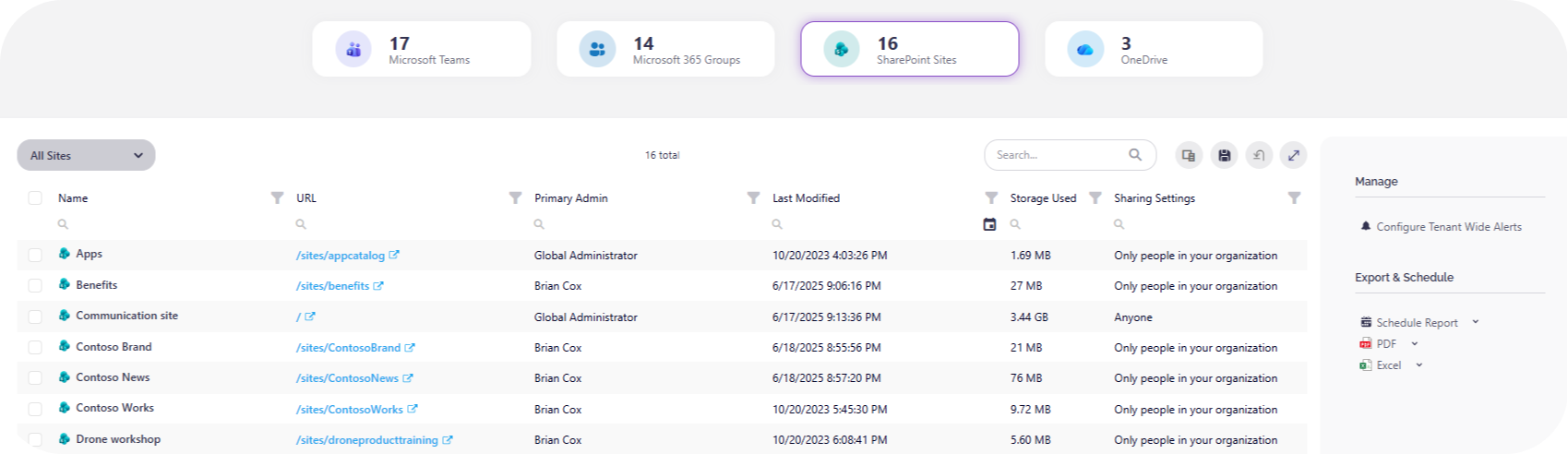
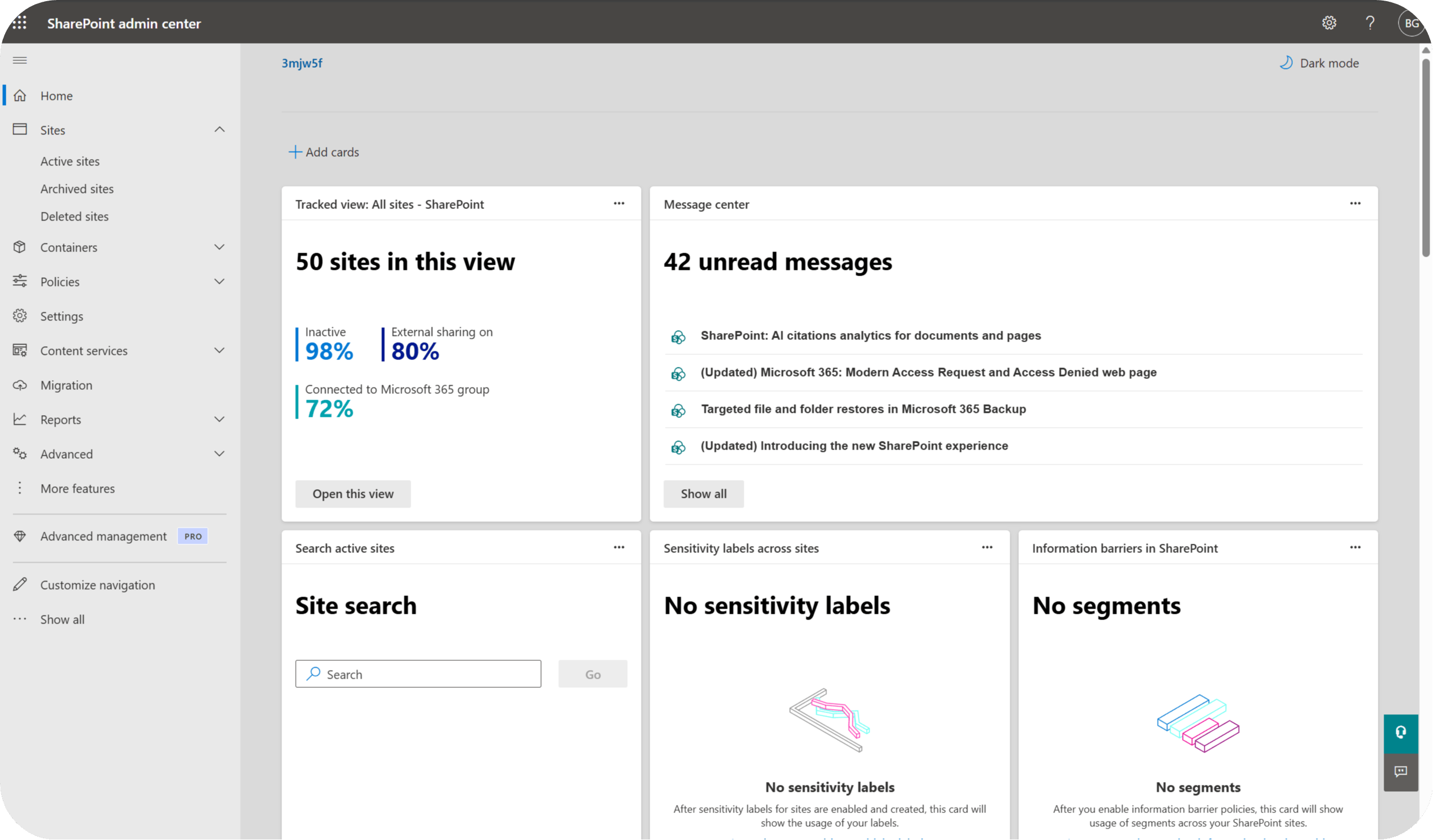
It also gives you a single, filterable inventory of Microsoft Teams, Microsoft 365 Groups, SharePoint sites, and OneDrives in one place, so you avoid jumping between multiple admin centers just to answer ‘who owns this and who can see it?’
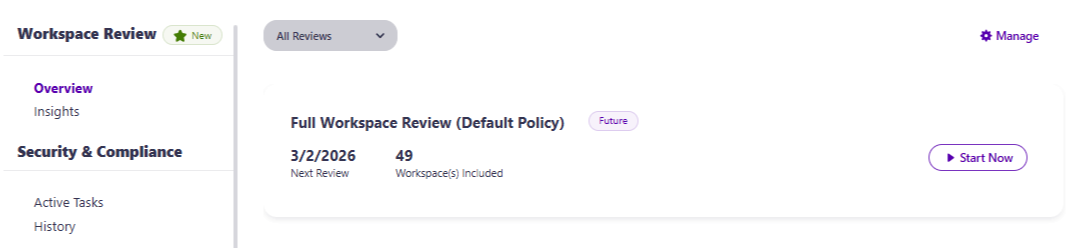
On top of that inventory, Syskit Point automates lifecycle. Instead of hand-crafted PowerShell scripts and ad hoc spreadsheets, you define rules that trigger owner reviews and ‘Renew, Archive, or Delete’ decisions based on activity, sensitivity, or age. Workspace owners receive guided review tasks – their decisions are logged with a full audit trail, and actions run consistently every time.

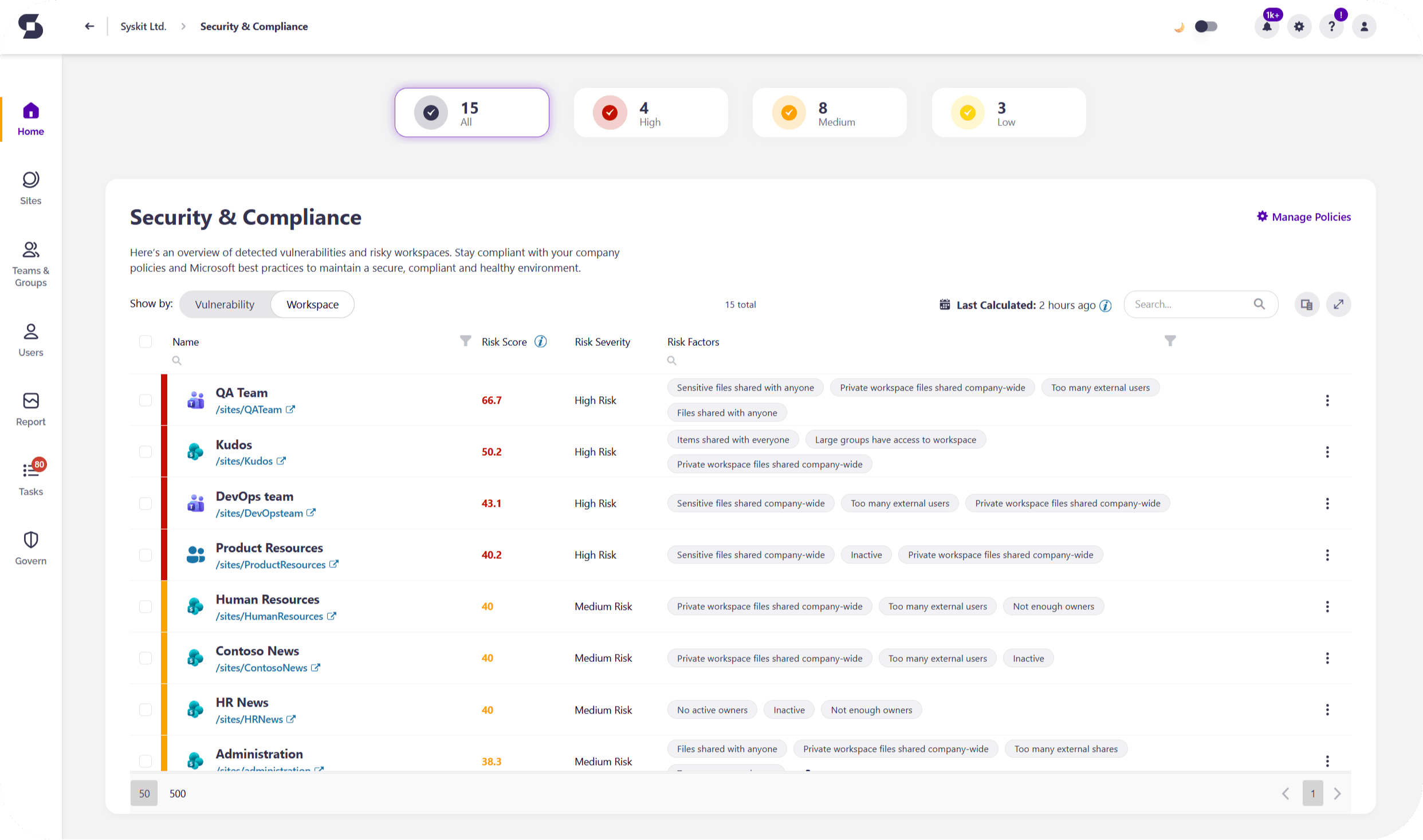
For Copilot, Syskit Point adds a dedicated readiness view that flags stale, risky, or overshared locations so you can exclude them from AI indexing before they pollute prompts with ROT content. The Security & Compliance dashboard also scores vulnerabilities in terms of high, medium, or low.
And let’s not forget setup speed! Because it’s shipped with all the governance patterns you need baked in, most organizations reach useful insights and first review campaigns in about 15 minutes – a tiny timeframe compared to wiring custom flows and scripts together.
Stop clean-ups: Use a self-governing tenant
SharePoint sprawl is a natural by-product of collaboration. It’ll happen whenever people work together at scale, so ensuring it doesn’t become unmanageable is key. And given the stakes, managing sprawl needs to be considered as a vital security measure by preventing oversharing and guest user vulnerabilities.
A winning system is a tenant where every site has a purpose, an owner, and a defined end:
- Use managed provisioning to prevent junk at the source.
- Use lifecycle policies to handle the inevitable ‘disposal’ phase.
- Use distributed reviews to make owners accountable.
Syskit Point ties those pillars together, shrinking the IT workload while keeping your tenant ready for Copilot and whatever comes next.