Are you overpaying for M365?
Table of contents
If you’re using Microsoft 365, you’re no stranger to the painful process of licensing.
Figuring out what licenses you need, and how many, is never a straightforward process. It’s difficult to keep track of who has which license and if they are using it, leading to a lot of waste. In the end, you’re spending money on licenses that aren’t being used properly.
As your M365 partners, we wanted to help you answer: “What is going on with my licenses and how can I save money?”
Syskit Point has offered reports to help manage your licenses for a while now. However, with the latest trends in Microsoft 365, we realized that our current solution wasn’t enough.
Today, we are proud to announce the evolution: License Optimization add-on.
With improved data, smarter reports, and a focus on identifying issues that help you achieve savings, staying on top of your licenses has never been easier.
Growing M365 pains (and costs)
The goal of Microsoft 365 is to provide you with the tools you need to manage your business and collaborate with others. In pursuit of this goal, Microsoft is constantly adding new products, changing packages, and increasing prices. Compounding the issue, as of November 2025, Microsoft has evened the playing field by removing volume-based discounts, putting many users at a disadvantage.
As a result, everybody, from small teams to large organizations, struggles with license optimization. It’s mostly forgotten until renewal time, when it becomes a big project requiring a lot of time and resources. Whether you’re hiring an external auditor or pulling workers off their current projects, it’s a messy process.
To make matters worse, even after all the spreadsheets and data analysis, it’s hard to answer the most important question: which licenses can I safely remove?
Making hard decisions without data
As Sherlock Holmes stated: “You see, but you do not observe.”
M365 admin center provides you with a simple list of licenses in your tenant. It shows you how many licenses you have and how many are assigned. However, this isn’t enough to help you spot patterns or make decisions.
You’re still left with many burning questions:
- How much am I paying for licenses?
- Do I need all these licenses?
- Do I have licenses assigned to inactive users?
- Are people using licenses assigned to them?
- Do people have licenses they don’t need?
- Which departments have the highest license costs?
Without knowing the answers to those questions, you cannot properly negotiate your license renewals and understand how your licenses are being used.
If licenses aren’t used, they are wasted
License optimization isn’t just about maintaining a clean environment and staying compliant. It’s about identifying waste and removing it. There’s usually a process for provisioning new licenses, but – what happens after?
The most common problems organizations face are:
- Leaving licenses assigned to inactive users.
- Leaving licenses assigned to users with blocked sign-in.
- Not tracking if assigned licenses are actively used.
- Assigning multiple licenses that cover the same set of features.
All these cases are not just a nuisance, they are actively costing you money.
How much money are you leaving on the table?
With rising costs and a global trend of reduced IT team budgets, achieving clear ROI has never been more important.
According to Gartner, only about 5% of organizations report achieving maximum value from their Microsoft 365 investment. And our internal research shows that, on average, about 14% of licenses are assigned to inactive users.
The situation with add-on licenses is even more dire. According to our internal research, 45% of Power BI Premium Per User and 60% of Power BI Pro licenses are unused. The number for Visio is even more shocking: over 90% of assigned licenses remain unused.
Licenses are being wasted every day, and nobody is taking a closer look until it’s time for renewal. It’s not enough to be aware of issues – you need a way to easily fix them and clearly track improvements over time.
Syskit Point: The simple way to analyze license inventory and reduce waste to save money
To solve these complex challenges, we realized that the solution itself must be simple. It needs to help you cut through the noise so you can focus on identifying and solving problems rather than gathering information.
With that in mind, our new License Optimization focuses on three key aspects: visibility, actionable insights, and clear ROI.
1. Visibility: Understanding your M365 license inventory
Like other Microsoft 365 challenges, everything starts with getting a sense of what’s already there. After all, you can’t spot patterns or identify issues if you lack the necessary data.
Syskit Point provides you with a centralized, up-to-date view of Microsoft 365 licenses, associated costs, and how those licenses are actually used. From the main dashboard, you can see a clear overview of your most important licensing metrics. These metrics can be expanded into a detailed report that helps you analyze them more closely.
- Cost of your licensing inventory
- Distribution of assigned licenses
- Detected issues
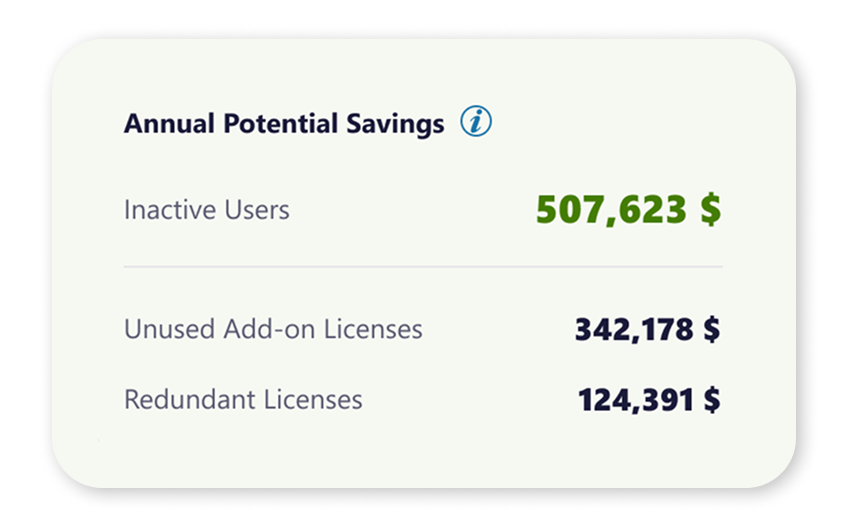
- Savings you can achieve
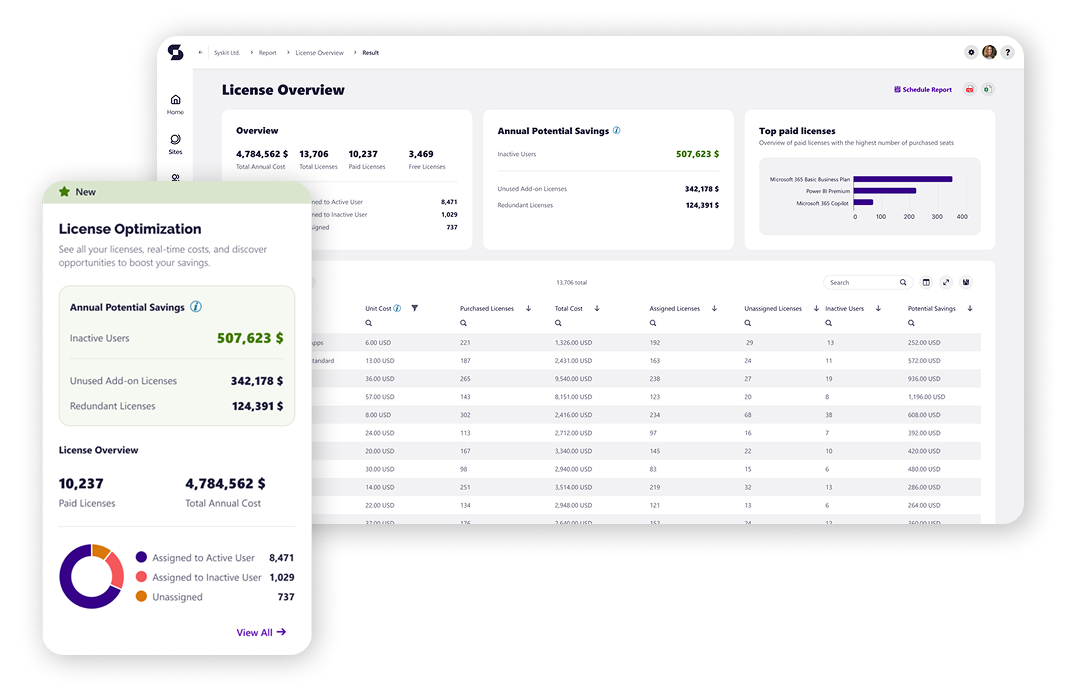
While our goal is to provide as much data out of the box, you always have the option to make adjustments if needed. This ensures that reports accurately reflect your actual costs.
2. Actionable insights: Identify problems and solve them with a single click
Once you have accurate data in one place, you can identify areas where licenses aren’t being used properly.
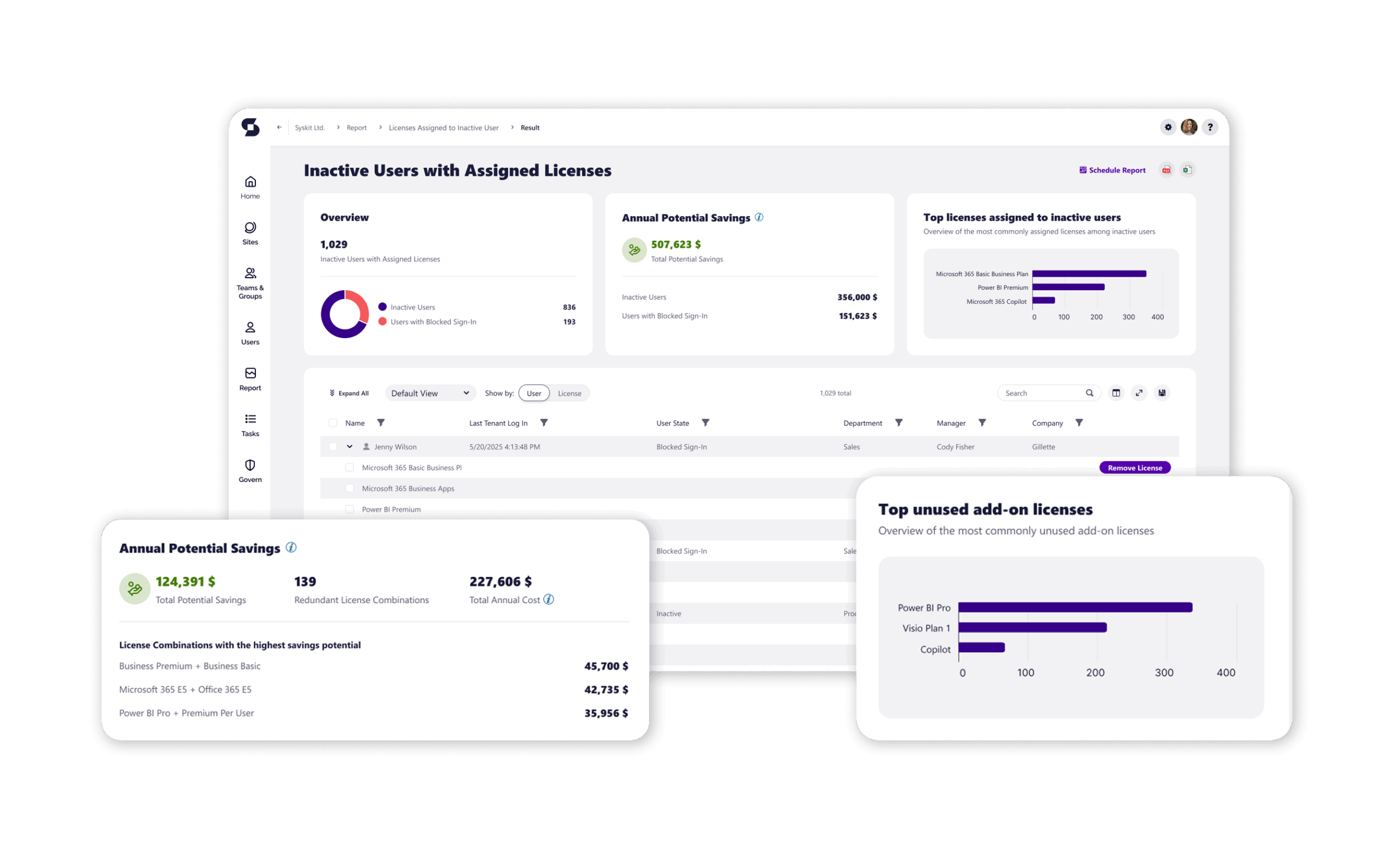
- Inactive users with assigned licenses. Having licenses assigned to ex-employees means you’re paying for licenses that aren’t being used.
- Unused add-on licenses. Someone requests a license for a project, but do they still need it after the project ends?
- Redundant licenses. If a user has E5, why would they need a separate Power BI Pro license if they already have those features?
- Internal chargeback. Often, the IT team handles licenses for the entire organization. Without understanding the breakdown of licenses across the company, how can you invoice the right teams?
By identifying areas where licenses aren’t utilized properly, you can take action as soon as problems arise. This helps you allocate licenses to users who actually need them, rather than buying additional seats to cover rising costs.
3. Clear ROI: From “potential savings” to “actual savings”
By continually tracking and optimizing your license growth, you don’t need to fear renewals as much. With Syskit Point’s licensing features, you approach renewals with confidence – knowing exactly how much you need to spend to keep your business running smoothly.
By understanding where money is spent and where savings can be achieved, you can keep your M365 running smoothly despite price increases. This means that renewal doesn’t need to be a project that drains time, money, and effort, but simply “business as usual”.
Embracing smarter license optimization
If you’ve previously tried our licensing reports, you can see how our new License Optimization not only greatly expands their capabilities but also adds new reports and features. That’s why we are giving existing customers a free preview to try it out until April 20.
We would love to hear your feedback on this new expansion, as well as what other struggles you’re having with M365 licensing.