5 Copilot security risks enterprise IT teams should know
Table of contents
Learn how Microsoft 365 Copilot amplifies existing permission, labeling, and governance gaps – and what to fix so AI doesn't turn hidden oversharing into a security incident.
Key takeaways
- Copilot exposes existing permission and governance gaps because it can surface anything a user's permissions already reach.
- The worst Copilot incidents start as ‘technically allowed’ access that nobody realized existed until its AI stitched it together.
- Prompt injection is an application-layer problem, but its impact is decided almost entirely by your access model.
- If you cannot explain what Copilot should see for a given role, you’re not ready to investigate what it did see.
- Syskit Point shrinks Copilot risk at once by finding and removing overshared access.
Microsoft 365 Copilot escalates security, privacy, and compliance risks because it surfaces, synthesizes, and may overshare sensitive internal data based on existing user permissions. Copilot simply inherits access from SharePoint, Teams, OneDrive, and Outlook. There’s no separate access layer or opt‑in gate for content that is already technically available to a user.
Those inherited permissions are rarely clean. In Syskit’s 2026 survey of 327 IT and security decision-makers, 99% acknowledged at least one live oversharing scenario, and 58% said confidential content is accessible to departments that shouldn’t see it. That oversharing existed before Copilot, but Copilot makes it searchable, summarizable, and quotable in a single prompt.
In practice, Copilot risk clusters into five categories:
- Permission sprawl that exposes more data than users should see.
- Prompt injection that manipulates responses or exfiltrates data.
- Sensitive content without labels.
- Shadow AI and unvetted plugins.
- Copilot activity that nobody reviews.
One important misconception deserves clearing up early. The notion that Copilot doesn’t train on your data is accurate according to Microsoft’s own privacy commitments. The real problem is that Copilot assembles and presents tenant data to anyone who has permissions and knows how to ask.
Risk 1: Permission sprawl
Copilot’s biggest security problem is your existing permissions. It accesses everything an authenticated user can reach at query time, with no extra approval, connection, or ‘are you sure?’ screen in between. Years of ‘Anyone with the link’ defaults, broad Microsoft 365 groups, and overshared SharePoint sites turn into a liability the day Copilot goes live.
The data backs this up. In Syskit’s 2026 survey, 83% of respondents were confident they knew exactly who had access to sensitive data, yet 90% had a confirmed or suspected security incident tied to misconfiguration or over-permissioned access in the past two years. The main risk comes from employees suddenly being able to surface content they technically had access to, but were never meant to see.
In the same survey, 91% were confident AI would surface only authorized content. Copilot did not create your permissions problem. It exposed it and then put a natural language interface on top.
You can see the impact in real stories. In more than one AI rollout, an Excel file titled ‘Redundancy List for 2026’ turned out to be shared with everyone in the company.
As Callum Ring, AI Innovation Architect at Bytes Software Services, put it during ‘Governing Microsoft 365 on the Golden Path to AI Value’:
“Copilot turns oversharing from a hidden issue to an instant vulnerability.”
The solution
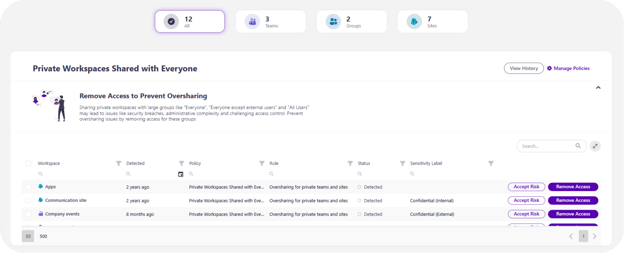
Syskit Point’s Copilot Readiness Dashboard maps permissions across Teams, SharePoint, and OneDrive, flags overshared links, and lets you clean them up in bulk before Copilot licenses go live.
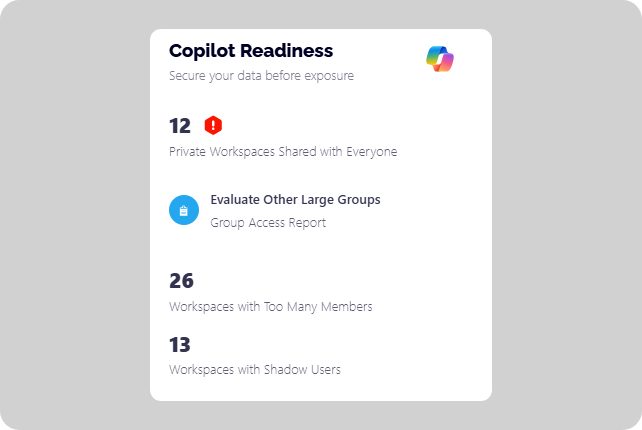
Organizations using Syskit’s delegated access review model perform around five times more permission management actions, with roughly 70% of those actions taken by workspace owners rather than IT. This keeps permissions aligned with business reality, without turning IT into a bottleneck.
Risk 2: Prompt injection attacks
Permission sprawl decides what Copilot can reach. Prompt injection decides what Copilot does with it. These are separate risk layers. Fixing permissions reduces the blast radius when something goes wrong, but it doesn’t block prompt injection on its own.
Prompt injection happens when an attacker hides instructions inside content that Copilot will process. This could be an email, a PowerPoint slide, a Teams message, or a document. When Copilot reads that content while answering a user’s question, those hidden instructions can override its normal guardrails and push it to leak data, call tools, or mislead the user. From a CISO’s perspective, it turns ‘untrusted content’ into ‘untrusted behavior’.
One of the most serious examples so far is EchoLeak (CVE-2025-32711), which Microsoft scored 9.3 Critical. A single crafted email was enough to trigger Copilot into silently exfiltrating the victim’s session history and referenced files through a scope‑violation chain, bypassing Microsoft’s classifier layer. The victim did not need to click anything; Copilot processed the email as part of its normal context window. Microsoft fixed EchoLeak on the service side in June 2025, so customers don’t need to take any action.
Microsoft has responded with additional controls such as Prompt Shields and classifier layers, but the underlying class of vulnerability has no permanent fix. Researchers keep finding new chains, including ASCII smuggling techniques that hide malicious instructions in invisible Unicode characters and still manage to pull data out of Copilot-integrated tools. Prompt injection remains a possibility.
“This is where it is important to be clear about scope. Syskit Point, our own platform, does not claim to solve prompt injection. Its role is to reduce how much sensitive content Copilot can reach when an injection succeeds. You still need dedicated application and AI security controls to detect and contain the prompt‑level attacks themselves.”
– Danijel Čižek, Product Manager Team Lead at Syskit
Risk 3: Sensitive content without labels
Copilot carries sensitivity labels forward: when it creates content from a labeled file in Word, PowerPoint, or Outlook, the new content inherits the highest-priority label and its protection. But inheritance only works where labels exist. A sensitive HR file that was never labeled passes nothing on, so Copilot's summary is unlabeled too, and DLP policies tuned to labels never fire.
That gap cascades quickly. Imagine this chain: an HR report sits in SharePoint without a label, and Copilot summarizes it. Nothing in the summary marks it as sensitive, so no DLP policy fires. An employee sees a clean, unmarked summary and forwards it in an email or posts it to a Teams channel that includes external guests.
From the system’s perspective, they shared an innocuous, unlabeled message. From a security perspective, they just moved sensitive HR data into a far broader audience with zero alerts.
This is where insider risk accelerates. On the negligent side, employees rely on labels and watermarks as their ‘are we okay to share this?’ indicator. But a summary of an unlabeled file carries no cues at all, so careful people make careless moves.
On the malicious side, a compromised account or disgruntled insider can use Copilot as a reconnaissance tool, asking it to pull together sensitive snippets from SharePoint, Teams, and email far faster than they could click through manually. Copilot can be used as an insider threat.
Enforcing labels and DLP behavior is firmly in Microsoft Purview’s domain. Purview is part of the Copilot control system that governs how classification and policies apply to content.
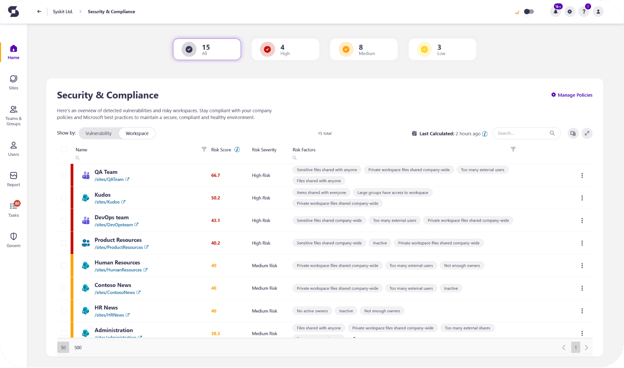
As a governance layer, Syskit Point plays a complementary role here. Its Workspace Sensitivity and Security & Compliance dashboards help you find overshared and unlabeled content so you know where you are exposed, but Syskit Point does not apply or enforce sensitivity labels itself.
Risk 4: Shadow AI and third-party plugins
Shadow AI is what happens when your people adopt AI faster than your governance, such as using AI tools, plugins, or agents that IT hasn't approved. According to Microsoft’s 2024 Work Trend Index, 75% of knowledge workers use AI at work, and 78% of AI users bring their own tools. Even if you have not rolled out Copilot, there’s a good chance employees are already pasting customer data, HR questions, or financial previews into consumer AI tools with zero visibility, logging, or DLP coverage.
“An AI agent today is no longer just a tool you consult for opinions. It can access data, modify it, delete it, interact with emails, and execute actions. The moment we allowed agents to act and make changes, rather than only observe, the situation fundamentally changed.”
– Frane Borozan, Microsoft MVP
Once you do enable Copilot, third‑party plugins, connectors, and Copilot Studio agents raise the stakes. A connector that pushes data into an external SaaS, or a plugin that calls an unmanaged API, can create an unmonitored exfiltration path.
Agents built by enthusiastic power users in Copilot Studio may query internal data and then send outputs to external services, all without a formal security review. Syskit’s own experts flag this as an emerging governance challenge. In Syskit’s 2026 survey, 9% of organizations said agents run with the permissions of the user who deployed them, with no separate controls.
Syskit Point’s AI Agents inventory lists Copilot Studio, SharePoint, and Agent Builder agents and Entra apps that can reach Microsoft 365 content, and lets you block or delete them or reassign an owner.
On paper, Microsoft covers Copilot under its GDPR commitments and HIPAA business associate agreement, and certifies it to ISO 27001 and ISO 42001. That covers Microsoft’s responsibilities, not yours. Your organization still needs its own DPIAs, records of processing, and audit trails for how staff use AI.
The US House of Representatives shows what a governed rollout looks like. It banned Copilot on congressional devices in March 2024 over concerns about leaking sensitive data to non‑approved cloud services. In September 2025, it started rolling Copilot out to staff with what it called “heightened legal and data protections”.
Risk 5: Copilot activity nobody reviews
Even if your permissions, labels, and plugins are in good shape, there’s a final problem: nobody is watching what Copilot does. Purview Audit logs every Copilot interaction and the files Copilot used. The gap is attention: in Syskit’s 2026 survey, 99% of organizations had audit logging on, but only 27% actively review logs with alerts.
That blind spot amplifies every previous risk. When Copilot surfaces an overshared file, the record is there, but nobody looks at it. A prompt injection that pulls data out leaves a trail nobody follows until it becomes an incident. And when auditors ask how staff use AI, the evidence exists, but no one has checked it.
Microsoft’s own answer here is its data security posture management for AI, which captures prompt and response data as part of the broader Copilot control system. That operates at the session layer – who asked what, and what Copilot returned.
How to secure your M365 tenant before enabling Copilot
You cannot remove every Copilot risk, but you can decide how much damage a mistake or attack can cause. A practical pre‑deployment plan focuses on four action areas.
1. Audit and clean up permissions (addresses Risks 1, 2, 3)
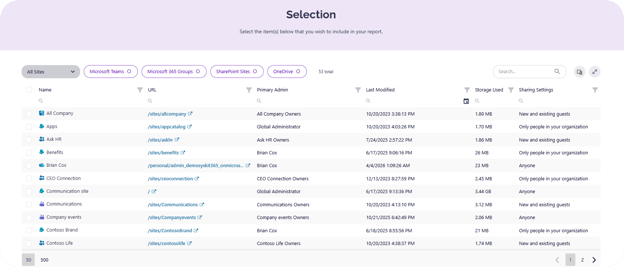
- Start with reports, not prompts. Run oversharing reports, such as Syskit Point’s Copilot Readiness tile and Sharing Links report, to find sites shared with everyone and ‘Anyone’ links that contain sensitive files. If you also want prompt-based testing, give it to a small security team with HR and legal approval, not to pilot users.
- Audit ‘Anyone with the link’ and company-wide sharing links across SharePoint and OneDrive, then remove unnecessary access in bulk. Syskit Point automates this across the tenant through its Sharing Links report.
2. Classify data and apply sensitivity labels (addresses Risks 3, 4)
Before a broad Copilot rollout, deploy a simple, workable sensitivity taxonomy in Microsoft Purview – something like Public, Internal, Confidential, and Highly Confidential – and apply it across M365. This ensures DLP policies can recognize and govern both source documents and AI‑generated content.
Next, review Microsoft’s Copilot control system guidance and create a Purview DLP policy for the Microsoft 365 Copilot location to stop Copilot from processing files with your most sensitive labels. That policy only works on labeled files, which is why the taxonomy above comes first.
3. Monitor and run ongoing access reviews (addresses Risks 4, 5)
Purview Audit already logs every Copilot interaction and the files Copilot used. Turn on Microsoft Purview’s data security posture management for AI to get reports and alerts on that activity, and give someone the job of reviewing them.
For permissions, move from one‑time cleanup to continuous correction. Syskit Point’s Workspace Reviews sends automated access reviews to workspace owners, so it’s easy to keep track of who has access to what. Syskit reports show this approach generates about five times more permission changes than IT‑only campaigns.
At the same time, inventory every agent and app that can reach your Microsoft 365 content. Syskit Point’s AI Agents inventory lists Copilot Studio, SharePoint, and Agent Builder agents and Entra apps, and lets you block or delete them or reassign an owner. Use Power Platform data policies to control which connectors agents can use.
Finally, review Bing web search settings in the M365 admin center, so Copilot does not blend sensitive internal answers with broad web context in ways your regulators would dislike.
4. Educate users on AI-specific risks
Technical controls fail if people treat Copilot as a magic black box. Train employees to treat AI like another powerful tool:
- Check outputs before sharing.
- Remember that summaries can contain sensitive data even when labels are missing.
- Report prompts or responses that feel suspicious.
Prepare your tenant for Copilot security risks
The five Copilot security risks share a single pattern – AI amplifies whatever governance foundation you already have, whether good or bad.
Purview works like a security camera: it shows what happened and who did what after the fact. Syskit Point is the locksmith. It makes sure the wrong people never had the keys in the first place. Microsoft governs the agents. Syskit Point governs the environment underneath.
That’s why permission cleanup is the highest‑leverage starting point. Tightening access reduces the blast radius of prompt injection, unlabeled content, shadow AI, and unreviewed Copilot activity in one move.
Try Syskit Point for a single view of permissions, oversharing risks, and workspace health across your Microsoft 365 tenant.