
Shadow AI in Microsoft 365: four layers and a blind spot
Table of contents
Microsoft’s native shadow AI stack detects unauthorized apps across four distinct security layers, but securing enterprise data requires governing the permissions beneath them.
5 key takeaways:
- The 2026 threat shifted: Shadow AI evolved from web prompts to local CLI agents and MCP servers that execute commands without human oversight.
- Agent 365 is a control plane: Microsoft’s engine aggregates signals from Intune, Entra, Purview, and Defender rather than operating as a standalone tool.
- Structural blind spots remain: Devices not onboarded to Defender or Intune, agents outside Defender’s support list, server-side scripts calling AI APIs, and personal accounts on unmanaged devices. Native blocking covers only OpenClaw.
- Detection ignores permission drift: Blocking rogue apps leaves internal oversharing untouched, while AI agents expose existing access flaws rather than creating new ones.
- Governance completes detection: Microsoft’s tools find and block unapproved AI. What sanctioned AI can reach is decided by your permissions, so they need continuous review, which is where a governance layer such as Syskit Point comes in.
Microsoft Agent 365 reached general availability on May 1, 2026, bundled inside the Microsoft 365 E7 suite. It marks Microsoft’s direct response to rogue AI tools and unapproved autonomous agents operating across enterprise networks.
However, Microsoft’s native security response is split across four admin surfaces:
- Microsoft 365 admin center (Shadow AI page)
- Microsoft Defender portal (Defender for Endpoint and Defender for Cloud Apps)
- Microsoft Entra admin center (Global Secure Access)
- Microsoft Purview portal
Microsoft’s guidance is split by problem. Its “Prevent data leak to shadow AI” deployment model ties Purview, Defender for Cloud Apps, Entra, and Intune into four steps for keeping data out of AI apps. Local agent discovery lives in Defender for Endpoint and the Microsoft 365 admin center, and agent governance in Agent 365. None of them covers what a sanctioned AI tool can reach once it’s inside your tenant.
This guide breaks down each native layer, then the gaps that remain once all four are deployed, from unmanaged devices and personal accounts to server-side scripts. Finally, we’ll cover the governance layer you still own once native detection and blocking are done.
What is shadow AI?
Shadow AI refers to consumer-facing AI applications, local agents, and autonomous tools deployed across an organization without IT visibility or approval.
Microsoft’s tools now detect local agents such as OpenClaw, Claude Desktop, Ollama, and coding CLIs, plus SaaS MCP servers and AI model APIs.
The distinction between shadow IT and shadow AI comes down to execution autonomy. Shadow IT’s main risks are data sprawl and compliance drift. Microsoft names three shadow AI risks: data leakage, compliance violations, and AI tools acting without oversight. The last is what’s new.
The threat surface has evolved past the 2024 paradigm of ‘employees pasting text into ChatGPT’. Today's local agentic CLIs run directly on the endpoint, executing terminal commands and reading local code repositories.
“Local agents run with the user’s own permissions. So the question isn’t only which agents are installed, it’s what that user can reach. If their access is overshared, so is the agent’s.”
– Danijel Čižek, Product Manager Team Lead at Syskit
How Microsoft 365 addresses shadow AI
Microsoft answers shadow AI by spreading detection across four individual security layers, with each product mapping to a distinct detection surface:
- Layer 1 – Endpoint: Microsoft Defender for Endpoint discovers local AI agents and their MCP server configurations on onboarded devices. The Shadow AI page in the Microsoft 365 admin center (Frontier preview) surfaces the detections and can block OpenClaw.
- Layer 2 – Network: Monitors web traffic, Generative AI usage, and MCP calls via Microsoft Entra Global Secure Access.
- Layer 3 – Data: Microsoft Purview stops sensitive data going to AI apps and retains prompts for investigations.
- Layer 4 – Risk scoring: Evaluates third-party cloud apps, AI model providers, and usage volume using Defender for Cloud Apps app catalog scoring.
Microsoft Agent 365 sits at the top as the central control plane, rather than operating as a standalone security tool. Microsoft positions it as your control plane to observe, govern, and secure agents and their interactions across the ecosystem.
It aggregates identity, threat, and data signals directly from Entra, Purview, and Defender rather than generating those underlying telemetry streams itself. Each layer targets a specific attack surface, as we’ll see below.
1. Endpoint detection with Defender for Endpoint and the Microsoft 365 admin center
The Shadow AI page in the Microsoft 365 admin center is where endpoint detections surface. Although Agent 365 reached general availability on May 1, 2026, the Shadow AI page is still in public preview under the Frontier preview program.
Microsoft Defender for Endpoint discovers local AI agents, from desktop apps to CLIs and IDE extensions, plus their MCP server configurations, on onboarded devices. The Shadow AI page surfaces these detections and can block OpenClaw on Intune-managed devices. Detection is broad; native blocking isn’t yet.
Selecting ‘Block AI agents’ within the details pane generates an Intune policy named A365 – Block OpenClaw.
This policy pushes down to managed endpoints, with propagation taking anywhere from 15 minutes to 8 hours.
To run endpoint detection, your tenant must satisfy several technical dependencies:
- Endpoint protection: Microsoft Defender for Endpoint on devices, for detection.
- Licensing: A Microsoft 365 E5 license to view Shadow AI agents. (Agent 365 has a standalone list price of $15/user/month with an annual commitment, or comes bundled in Microsoft 365 E7 at $99/user/month.)
- Device management: Intune enrollment for managed Windows devices.
- Admin roles: One of several eligible roles, including Security Administrator, AI Administrator, or Intune Administrator.
- Tenant configuration: Active opt-in to the Frontier preview program.
- Optional: Global Secure Access, for usage metadata such as traffic and most recent activity.
Microsoft notes that blocking currently works only on managed Windows devices enrolled in Intune.
2. Network discovery with Microsoft Entra Global Secure Access
When AI usage shifts away from local binaries and toward cloud endpoints, network inspection takes over. Microsoft Entra Global Secure Access (GSA) inspects web and cloud traffic to flag connections bound for consumer AI tools, SaaS-hosted Model Context Protocol (MCP) servers, and AI model provider APIs like OpenAI and Anthropic.
Microsoft splits network visibility into two complementary layers within the Microsoft Entra admin center:
- Shadow AI Discovery: Live inside the Application Usage Analytics dashboard, this report provides an inventory of AI services hit by your users. It answers the fundamental question: Which AI applications exist on the network?
- Generative AI Insights (preview): Logs the full prompt sent to 11 supported AI apps, which requires TLS inspection, and records MCP calls to remote servers, including private ones no catalog knows about. It answers: What data is actively moving into these tools?
As agents increasingly rely on MCP servers to reach remote databases and third-party APIs, GSA logs these protocol interactions to spot server-side automation. However, local MCP servers running over IPC loops or localhost ports remain completely invisible to network-layer inspection.
Network-level detection requires Microsoft Entra Internet Access (available standalone or as part of the broader Entra Suite) alongside the GSA client deployed directly to end-user machines. Prompt logging also needs TLS inspection.
Devices lacking the client, unmanaged BYOD endpoints on home networks, and split-tunnel VPN configurations bypass this network layer entirely.
3. Data protection and prompt governance with Microsoft Purview
While Entra and the Microsoft 365 admin center focus on applications and endpoints, Microsoft Purview governs the data-flow layer. It controls what leaves your tenant and retains audit records when sensitive information moves through AI tools.
Microsoft’s deployment model sets out four steps across Purview, Defender for Cloud Apps, Entra, and Intune:
- Discover: Identify unknown AI applications in use across the tenant.
- Block: Restrict user access to unapproved or high-risk AI platforms.
- Prevent: Apply Data Loss Prevention (DLP) rules to block sensitive fields (like SSNs, credit card numbers, or proprietary source code) from being submitted into sanctioned AI tools.
- Govern: Retain prompt and response interactions for compliance investigations and eDiscovery.
Sequence matters here. Steps 1 and 2 cover initial discovery and blocking, whereas Steps 3 and 4 assume a sanctioned AI tool like Copilot is active. Attempting to skip directly to Step 4 leaves you logging retention on empty pipelines.
For compliance officers, Step 4 represents the core audit capability. Once a collection policy captures prompts from third-party AI apps, retention policies for the Enterprise AI apps and Other AI apps locations keep them for legal hold and investigations. Most capture methods are billed pay-as-you-go; capture through Global Secure Access is licensed per seat instead.
Advanced AI DLP rules and Data Security Posture Management (DSPM) typically require Microsoft 365 E5 or specialized Purview compliance add-ons.
Purview controls what sensitive data goes to AI apps and keeps a record of it. What sanctioned AI tools like Copilot can read inside your environment still comes down to the underlying SharePoint permissions and oversharing defaults.
That is where dedicated governance platforms like Syskit Point step in to clean up tenant permissions and close the visibility gap before AI tools surface sensitive content.
4. Risk scoring with Microsoft Defender for Cloud Apps
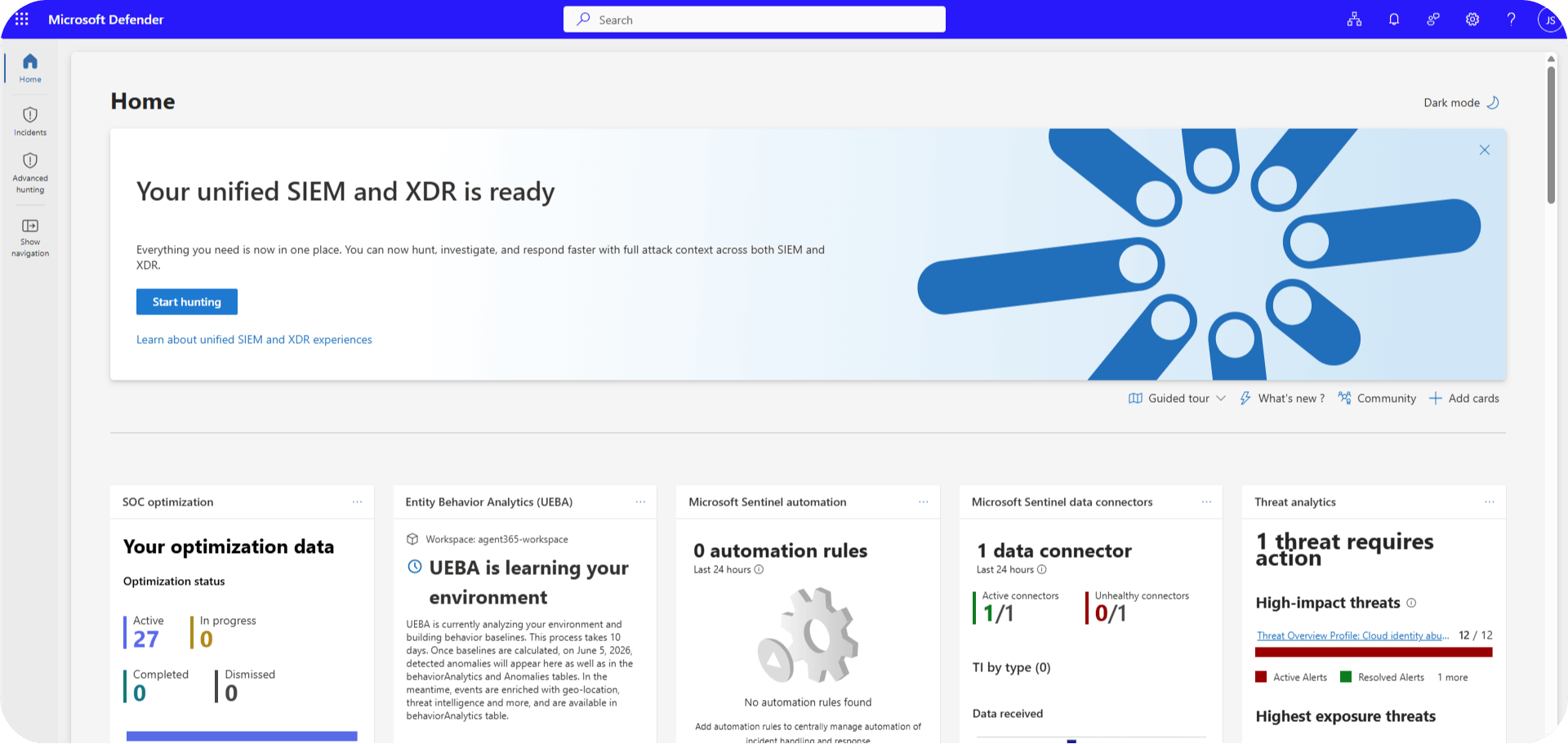
Microsoft Defender for Cloud Apps serves as the underlying discovery and intelligence engine that powers Purview’s initial identification of unsanctioned AI services. It continuously evaluates third-party cloud tools against an extensive global catalog of over 31,000 applications.
Defender for Cloud Apps assesses discovered AI tools across four critical security dimensions to assign an aggregate risk score from 1 to 10, where 10 is the lowest risk:
- General: Evaluates vendor operational health, legal headquarters, and physical data-center locations.
- Security: Verifies technical controls, including data-at-rest encryption standards, multi-factor authentication, and admin audit logging.
- Compliance: Checks for essential industry certifications like SOC 2, ISO 27001, HIPAA, and PCI-DSS.
- Legal: Inspects vendor data-retention frameworks, DMCA compliance, and terms of service regarding consumer data usage.
Beyond static scoring, Defender applies machine-learning models to profile normal tenant activity. Its anomaly detection engine flags behavioral spikes – such as impossible travel, access from unknown countries, or sudden mass file downloads and external sharing events – that can signal a compromised account.
Full CASB capabilities, behavioral anomaly detection, and deep session controls require Microsoft 365 E5, the E5 Security add-on, or a standalone Defender for Cloud Apps license.
A lighter Cloud App Discovery feature ships with Microsoft 365 E3 and Microsoft Entra ID P1, providing baseline inventory reports and risk scores without active session enforcement.
|
Layer |
What it sees |
What it requires |
What it doesn’t see |
|---|---|---|---|
|
Defender for Endpoint + Microsoft 365 admin center Shadow AI page |
Local AI agents and their MCP server configurations on onboarded devices; blocks OpenClaw |
Defender for Endpoint, Microsoft 365 E5 (to view), Intune enrollment, Frontier opt-in |
Devices not onboarded to Defender, unlisted agents, blocking beyond OpenClaw |
|
Entra Global Secure Access |
AI app traffic, prompts, MCP connections |
Entra Internet Access + Entra ID P1 + GSA client on endpoints + TLS inspection (for prompts) |
Devices without GSA client, split-tunnel traffic |
|
Purview |
Sensitive data leaving to AI apps, prompt content |
Purview DLP + DSPM (typically E5); a collection policy for third-party AI prompts |
Internal permission sprawl, oversharing |
|
Defender for Cloud Apps |
Cloud AI app risk scores, anomalies |
E5 Security or standalone |
On-device local model activity |
The blind spots the four-layer stack doesn't cover
According to Microsoft’s Work Trend Index, 82% of business leaders plan to integrate AI agents to expand workforce capacity within the next 12-18 months. The four-layer stack above is what most IT teams will reach for first. But even fully deployed, it leaves gaps.
Structural coverage gaps
With all four Microsoft security layers active, these vectors remain unmonitored:
- Unmanaged devices: BYOD and contractor laptops that aren’t onboarded to Defender for Endpoint or Intune, or don’t run the Global Secure Access client, bypass Layers 1 and 2.
- Unmanaged browsers and accounts: On devices without the Global Secure Access client or Purview endpoint DLP, personal accounts and non-Edge browsers aren’t inspected.
- Locally run models Defender doesn’t list: Defender discovers engines such as Ollama and LM Studio, but not llama.cpp, which sends no traffic for Global Secure Access to see.
- Blocking beyond OpenClaw: Microsoft detects dozens of local agents, but the Shadow AI page can block only OpenClaw.
- Server-side agentic scripts: Cron jobs, Python scripts, and CI/CD pipelines invoking AI APIs operate independently of monitored user endpoints.
The deeper distinction: detection vs governance
Microsoft’s native stack answers: “Which AI tools are running in my environment?” But it does not answer: “What can those AI tools access once authorized?”
As Vlad Catrinescu, Microsoft MVP and Technical Evangelist at Syskit, notes in the Dawn of the Agent 365 whitepaper:
“If nobody owns an agent, that agent shouldn’t exist.”
An application registry confirms an agent’s existence, but it does not establish ownership, map data permissions, or track lifecycle changes. Syskit’s 2026 survey found that only 22% of organizations have a formal access policy for AI agents, and 9% let agents run with the deploying user’s permissions and no separate controls. Blocking OpenClaw or flagging a desktop agent does not fix internal permission drift or overshared SharePoint workspaces.
AI agents do not create new security risks from scratch; they expose and accelerate existing access flaws. As Rob Chipperfield, Security Manager at Redgate Software, highlights:
“AI doesn't grant access to the data itself, but can leverage existing access to surface sensitive data inappropriately.”
Content once buried deep in folder hierarchies surfaces instantly when an authorized user queries Copilot or a custom SharePoint agent. In the same survey, 91% are confident AI would surface only content users are authorized to see, yet 58% say confidential content is accessible to departments that shouldn’t see it. Closing this gap requires shifting from application discovery to data-layer governance.
Governing what AI can reach inside your Microsoft 365 tenant
Microsoft Agent 365 governs the agents. Syskit Point governs the environment underneath.
While Microsoft’s native stack focuses on application-level detection, long-term security relies on controlling what sanctioned AI tools access once active. Three core practices close the gap native security leaves open:
- Continuous permission cleanup: Syskit Point’s Cleanup Opportunities tile shows leftover anyone links, external users whose access no longer fits your sharing policy, and unique permissions nobody uses. Redundant unique permissions can be removed automatically every day, with each change logged, so oversharing doesn’t quietly build back up.
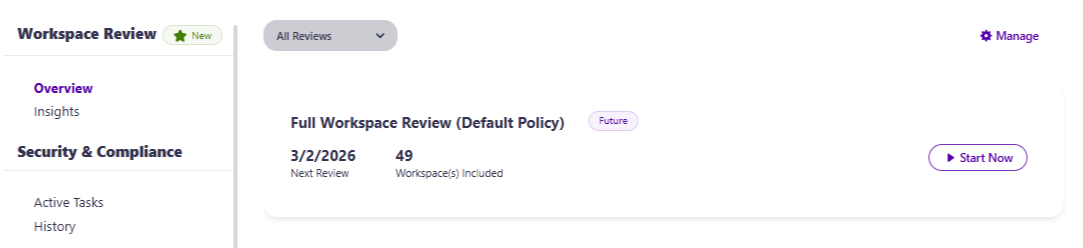
- Automated workspace reviews: Syskit Point’s Workspace Reviews delegate access reviews to workspace owners across Teams, SharePoint sites, M365 Groups, and OneDrive, so the people closest to the data confirm who still needs access and stale permissions get removed.
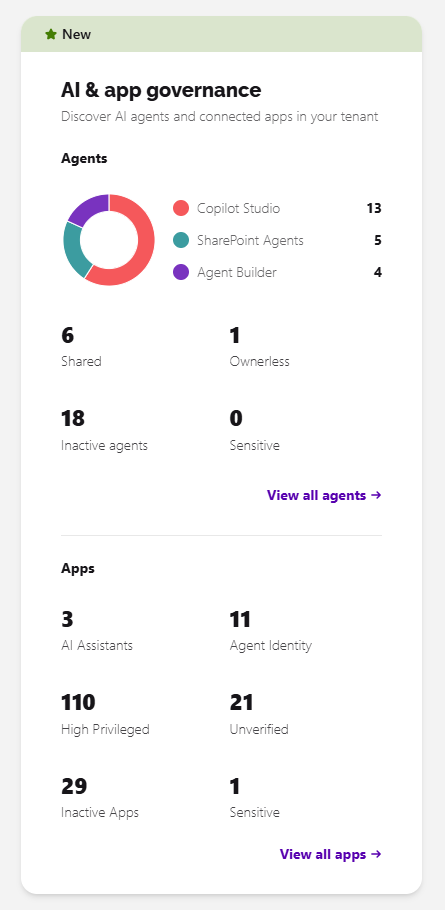
- Internal agent inventory: Syskit Point’s AI & app governance tile lists every SharePoint, Copilot Studio, and Agent Builder agent in your tenant, flags the ones that are ownerless, shared with everyone, or grounded on sensitive content, and can reassign ownerless agents automatically.
Real-world proof: Redgate Software
Redgate Software used Syskit Point to get its Microsoft 365 environment ready for AI. The team removed 2,000 expired sharing links, began remediating 3,000 inactive guest users, and identified 4 TB of potential storage savings.
See it in your own tenant
Detection is only the first step. AI security also depends on the permissions behind every answer.
Syskit Point is the governance layer for Microsoft 365 – delivering control, security, cost optimization, and AI confidence. It works alongside Microsoft’s native security stack, giving you the tools to manage your entire environment.
Syskit Point offers a 21-day free trial with no credit card required – or explore our AI security solution to see permission reporting in action.