Govern AI access and activity in your M365
Visibility
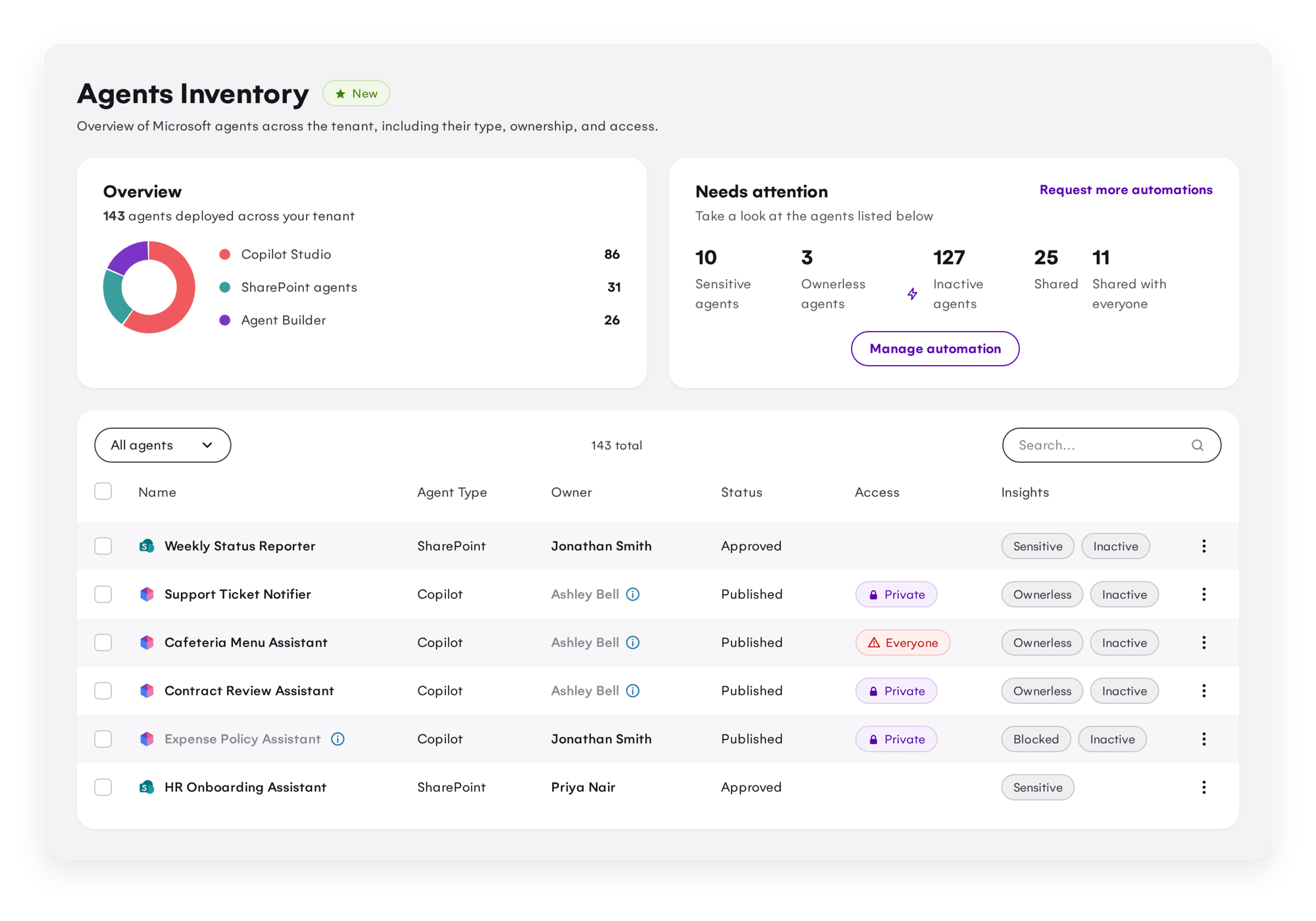
See every SharePoint, Copilot Studio and Agent Builder agent, and the AI assistants like ChatGPT and Claude that connect to your tenant, in one place.
Auditing
Track what AI agents and assistants actually do in Microsoft 365, not just what they can access, and spot risky activity in seconds.
Governance
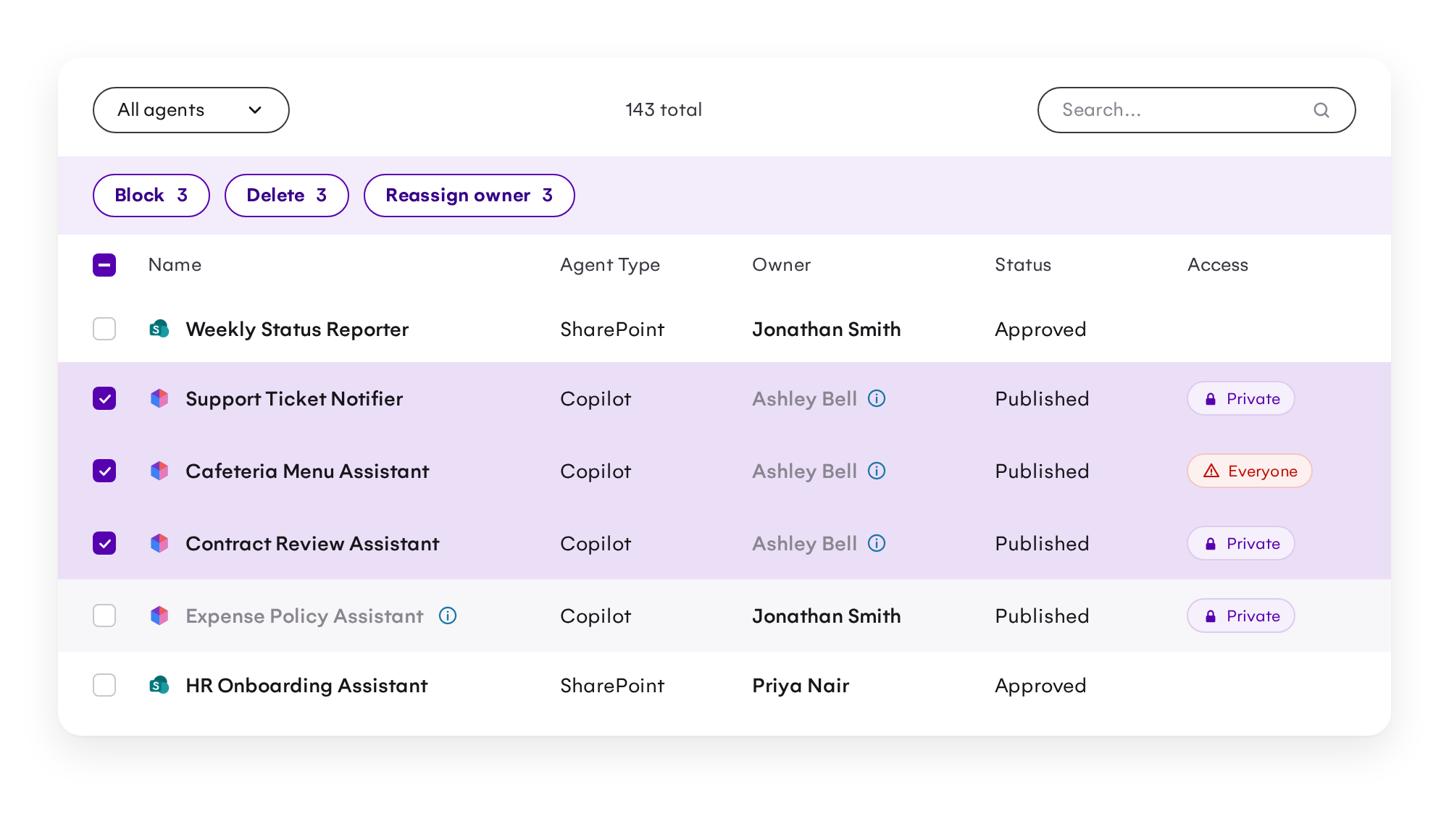
Manage agents and assistants lifecycle: block, delete, or reassign agents. Set up automation so ownerless agents never go unnoticed.
AI readiness
Agents are only as safe as the content behind them. Keep permissions and content in shape before AI acts on them.
AI agent sprawl amplifies permission risks
AI agents are another way into your Microsoft 365 content. They inherit the permissions and the clutter of the content they use, so they amplify existing permission mistakes by making overshared data easier and faster to access and expose at scale.
As agents multiply across Copilot Studio, Agent Builder and SharePoint, and AI assistants like ChatGPT and Claude connect to your tenant, most IT teams have no central view of them, no record of what they do and no control over ownerless, inactive or risky agents.
With Syskit Point, you can:
- See AI agents and assistants accessing your Microsoft 365
- Track what AI actually does, not just what it can do.
- Control the lifecycle of everything accessing your Microsoft 365
All SharePoint, Copilot Studio and Agent Builder agents in your tenant, so you get a complete overview with owner, status, access and insights.
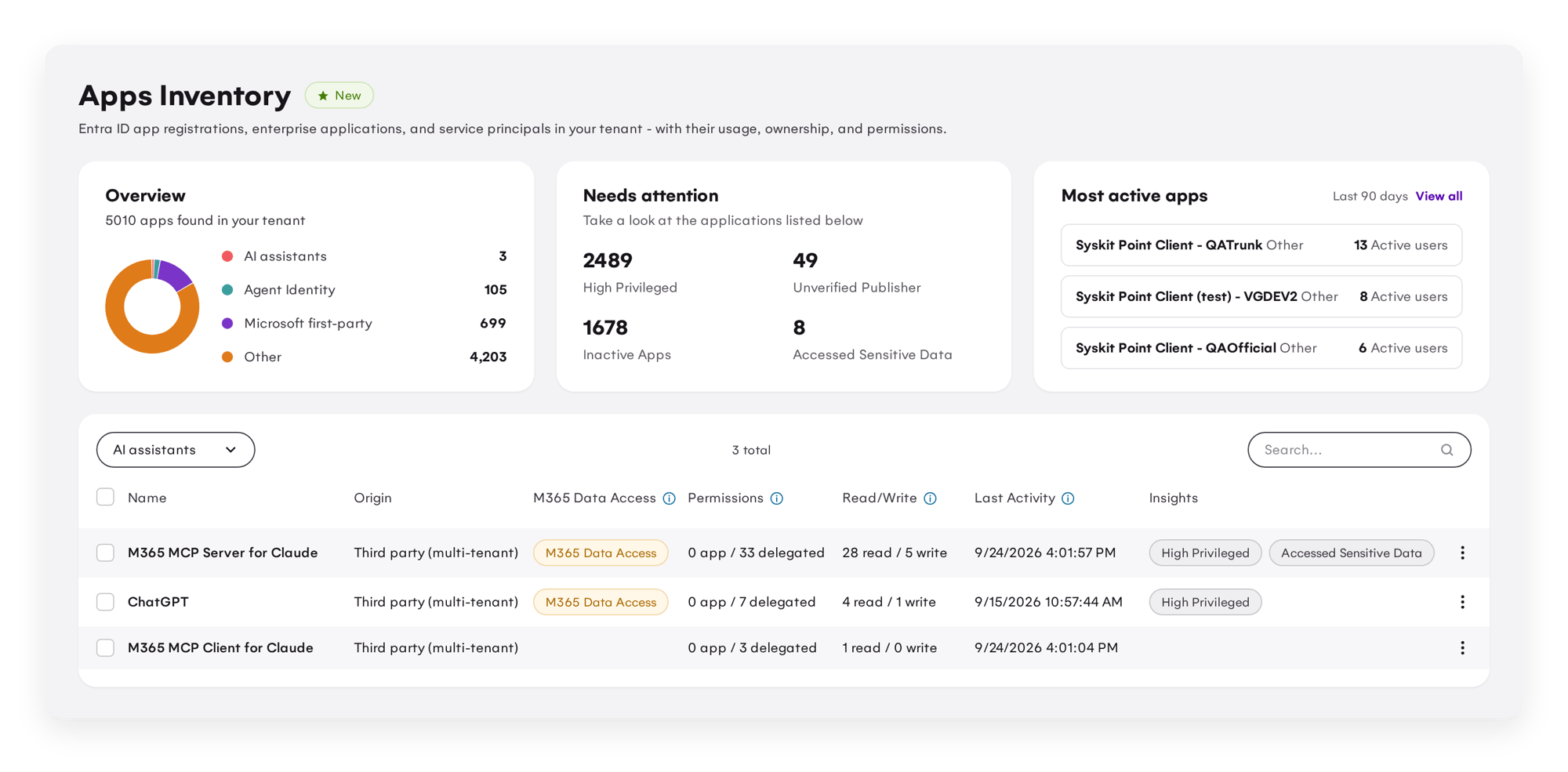
AI assistants like ChatGPT and Claude, agent identities and other enterprise apps from Entra, so no app goes unnoticed.
See every AI agent and assistant in one view
You can’t govern what you can’t see. No more digging through multiple admin centers to piece the picture together. Get a single view of everything accessing your Microsoft 365, from users and guests to AI agents and assistants.
All SharePoint, Copilot Studio and Agent Builder agents in your tenant, so you get a complete overview with owner, status, access and insights.
AI assistants like ChatGPT and Claude, agent identities and other enterprise apps from Entra, so no app goes unnoticed.
Trace what AI really does
Permissions show what an agent or AI assistant could reach. Activity shows what it actually did. See active users for agents and apps, plus file activity for apps, so you spot risky activity in seconds.
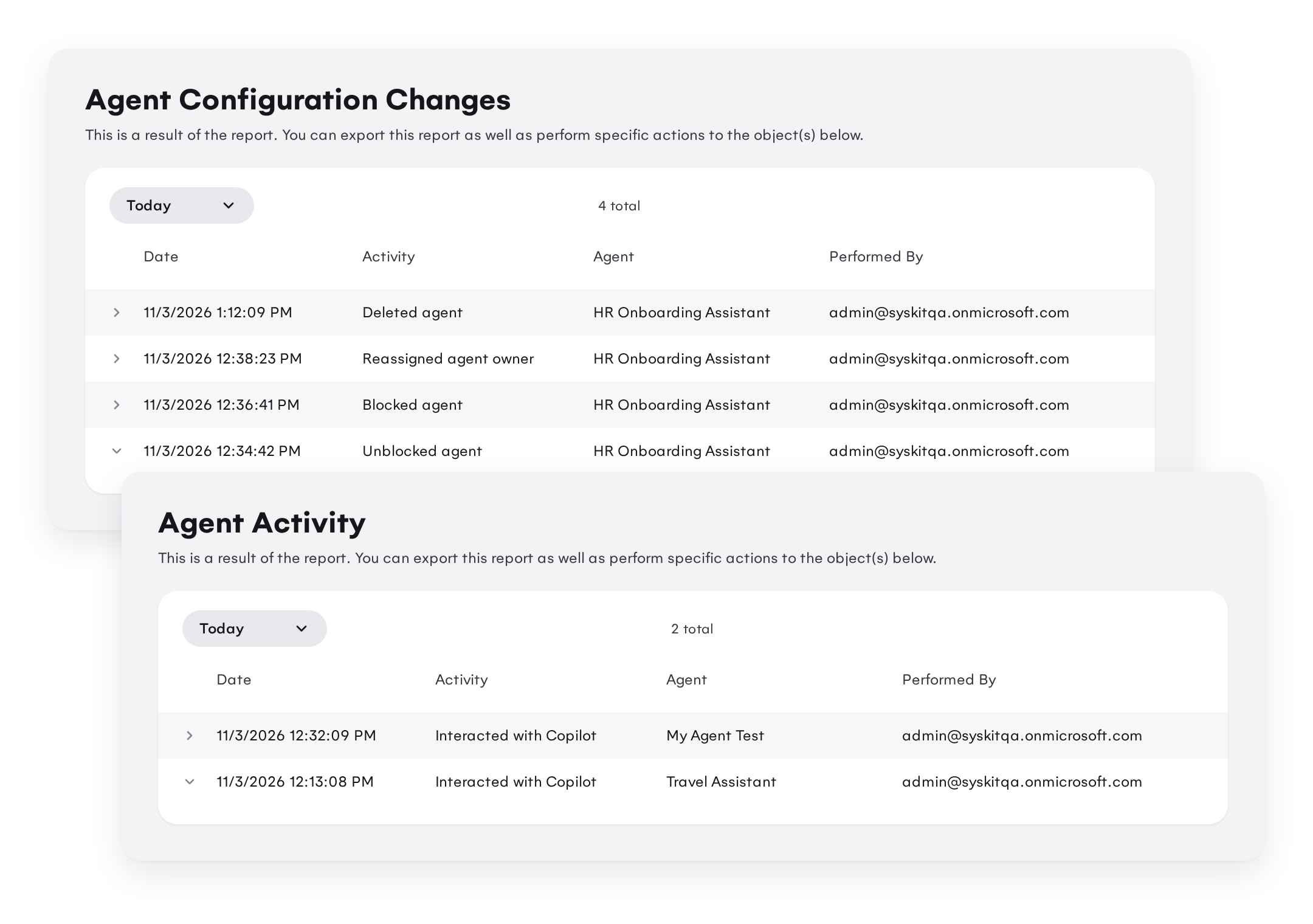
Two audit reports take you deeper. The Configuration changes report shows who changed an agent's or app's configuration, what changed and when. The Activity report shows what files they touched, who they acted for, and sign-ins to them.
Act on ownerless, inactive, or risky agents immediately, straight from the inventory.
- Block or delete agents and apps
- Reassign an agent's owner
Coming soon: Automation to delete inactive agents after a grace period you set.
Manage all agents' lifecycles
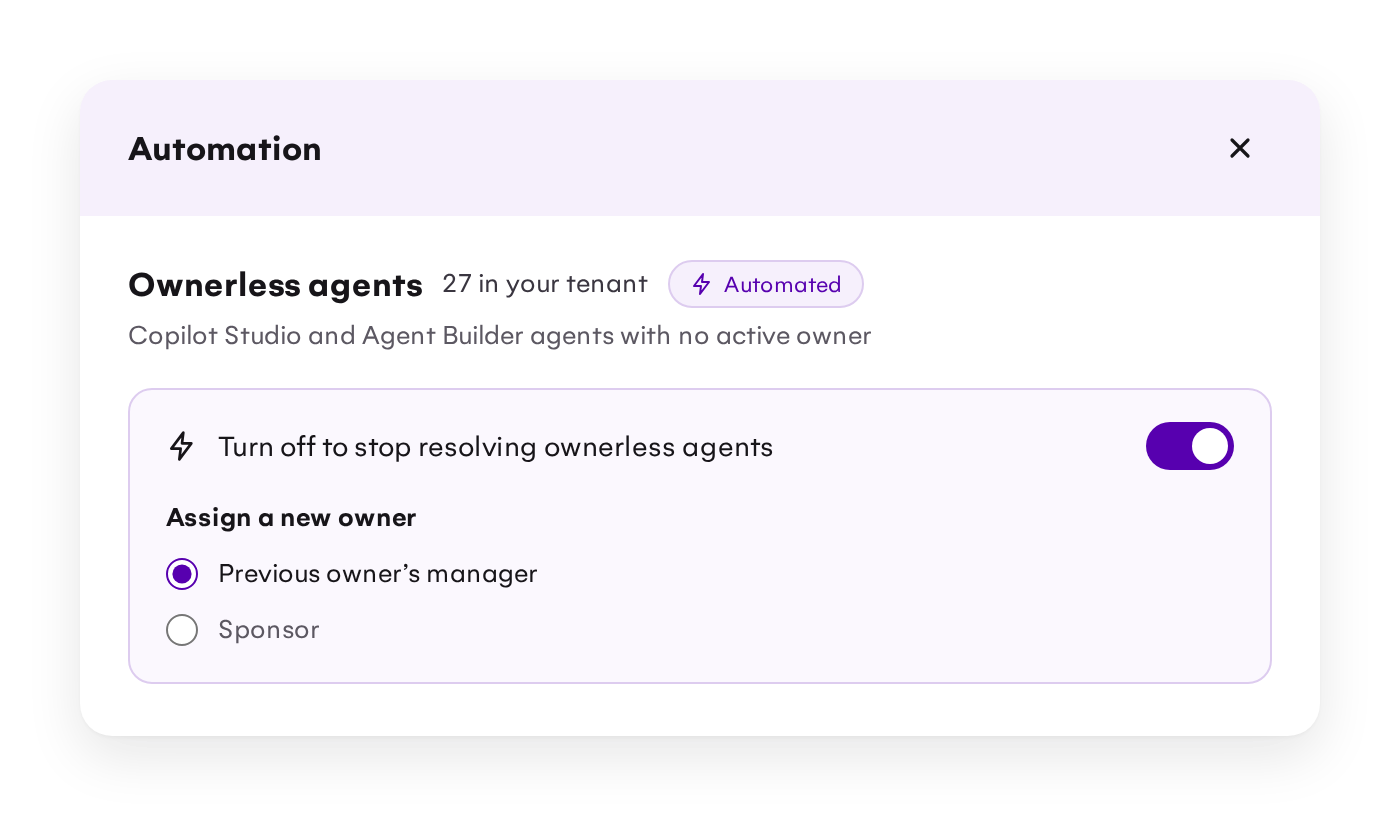
Less sprawl, less exposure. Block or delete agents and apps, or reassign an agent’s owner, straight from the inventory, so you can act on ownerless, inactive, or risky agents right away. Set up an automation to assign new owners to ownerless agents, so no agent is left unmanaged.
Act on ownerless, inactive, or risky agents immediately, straight from the inventory.
- Block or delete agents and apps
- Reassign an agent's owner
Coming soon: Automation to delete inactive agents after a grace period you set.
Safe AI adoption starts with continuous Microsoft 365 governance
Agents are only as safe as the content behind them. Syskit Point governs the Microsoft 365 environment where AI runs, so agents and Copilot are grounded in up-to-date content and the right permissions, and work safely, confidently and with better response quality.
For each agent, see who else can open the content it reaches. Workspace reviews ask owners of Teams and sites to confirm who should still have access, so agents don't pass on oversharing, and stale file policies move files nobody has touched in years to Microsoft 365 Archive, where Copilot no longer uses them.
The Syskit Point advantage
| Features | Syskit Point | Microsoft 365 |
| Inventory of SharePoint, Copilot Studio and Agent Builder agents, with owners, knowledge sources and sensitive content | Basic list; risk and activity data only with Agent 365 license | |
| Inventory of AI assistants like ChatGPT and Claude, with owners and permissions | Mixed in with all Entra enterprise apps | |
| See who else can open the content each agent uses | N/A | |
| Automatic owner reassignment for ownerless Copilot Studio and Agent Builder agents | Agent Builder only, admin-run; requires Agent 365 license | |
| Inactive agent automated cleanup | Coming soon | Only agents with an Agent ID*; custom timings require Agent 365 + Entra P1 or Microsoft 365 E3 |
| Per-agent activity audit with reports | Only with Agent 365 license | |
| Agents, permissions and workspaces in one place | Split across several admin centers | |
| No additional license required | Requires Agent 365 ($15/user/month) or Microsoft 365 E7 ($99/user/month) |
*Agent ID is an agent's own identity in Microsoft Entra. Agent Builder agents and Copilot Studio agents created before May 2026 don't have one. Microsoft details are based on Microsoft's public documentation as of November 2026; some features are in preview and may change.
Stay in control of AI agents in Microsoft 365
Govern your agents and AI assistants in the same place as your permissions, workspaces and storage. No Agent 365 license needed.