How to govern AI agents in Microsoft 365 without Agent 365
Table of contents
Key takeaways
- Agents inherit the access of their sources, so oversharing and stale content carry over to them.
- When an agent’s builder leaves, the agent keeps running and nobody is accountable for it.
- Microsoft’s native tools are spread across several admin centers, need an extra license, and don’t cover every agent.
- Syskit Point now automatically gives ownerless agents a new owner and audits every change to them, without Agent 365.
- Point also governs the content agents use, through access visibility, workspace reviews, and archiving stale files.
- Every agent needs an owner, a trail, and clean content behind it.
AI agents and assistants are now part of everyday work in Microsoft 365. People build agents in Copilot Studio, Agent Builder, and SharePoint, connect assistants like ChatGPT and Claude, and share them with their teams. That’s the point: they make work faster.
But agents don’t create their own access. They inherit it. An agent can reach whatever its sources can reach, so it passes on every overshared site, every forgotten sharing link, and every file nobody has touched in years. An agent is only as safe as the content behind it.
Then people move on. The person who built the agent leaves the company, but the agent keeps running and stays shared. Nobody is accountable for what it can access or what it does.
Every agent needs an owner, and every change needs a trail. Here’s where Microsoft’s native tools fall short, and how Syskit Point closes the gap.
Where Microsoft’s native agent governance stops
Microsoft brings strong security and runtime monitoring for agents. But if you’re trying to keep agents owned, clean, and accountable, you’ll run into a few gaps.
- Everything is split across admin centers: Agent settings live in Entra, the Microsoft 365 admin center, and My Account, while data and threats sit in Purview and Defender. You manage permissions and workspaces somewhere else again.
- Risk and activity data need a new license: Without Agent 365, you get a basic list of agents in the Microsoft 365 admin center, with no risk or activity data. Agent 365 costs $15 per user per month on top of your existing licenses, or comes with Microsoft 365 E7 at $99 per user per month.
- Ownerless agents still need an admin: Microsoft’s reassignment rule covers only Agent Builder agents. An admin reviews and runs it each time, and Microsoft doesn’t tell the new owner they now own an agent.
- Lifecycle policies don’t see every agent: Entra lifecycle policies (in preview) manage only agents with an Agent ID (an identity of their own in Microsoft Entra). Agent Builder agents and Copilot Studio agents created before May 2026 don’t have one yet, so they slip through.
These tools focus on the agents themselves, not the root problem: the oversharing and outdated content that every agent inherits.
From reporting to governing
Syskit Point already shows you every SharePoint, Copilot Studio, and Agent Builder agent in your tenant, with its owner, knowledge sources, and sensitive content. It also picks out AI assistants like ChatGPT and Claude from the rest of your Entra apps, so you can see their owners and permissions and block or delete them. With the latest release, governance for AI agents and assistants is generally available for every tenant, and Point moves from reporting on agents to governing them.
Ownerless agents automation: set it once, keep every agent owned
Until now, Point showed you ownerless agents and let you delete, block, or reassign them. But you still had to decide on each agent by hand and guess who should own it.
Ownerless agents automation removes that guesswork and puts the ownership decision where it belongs: with the business, not IT.
Turn it on with a toggle in the Ownerless agents automation section of the Agents Inventory. From then on, Point runs a daily policy across both Copilot Studio and Agent Builder agents and gives every ownerless agent a new owner, based on the rule you choose:
- Previous owner’s manager: the agent goes to the manager of the person who left.
- Sponsor: the agent goes to its sponsor. This applies to Copilot Studio agents; Agent Builder agents always go to the previous owner’s manager.
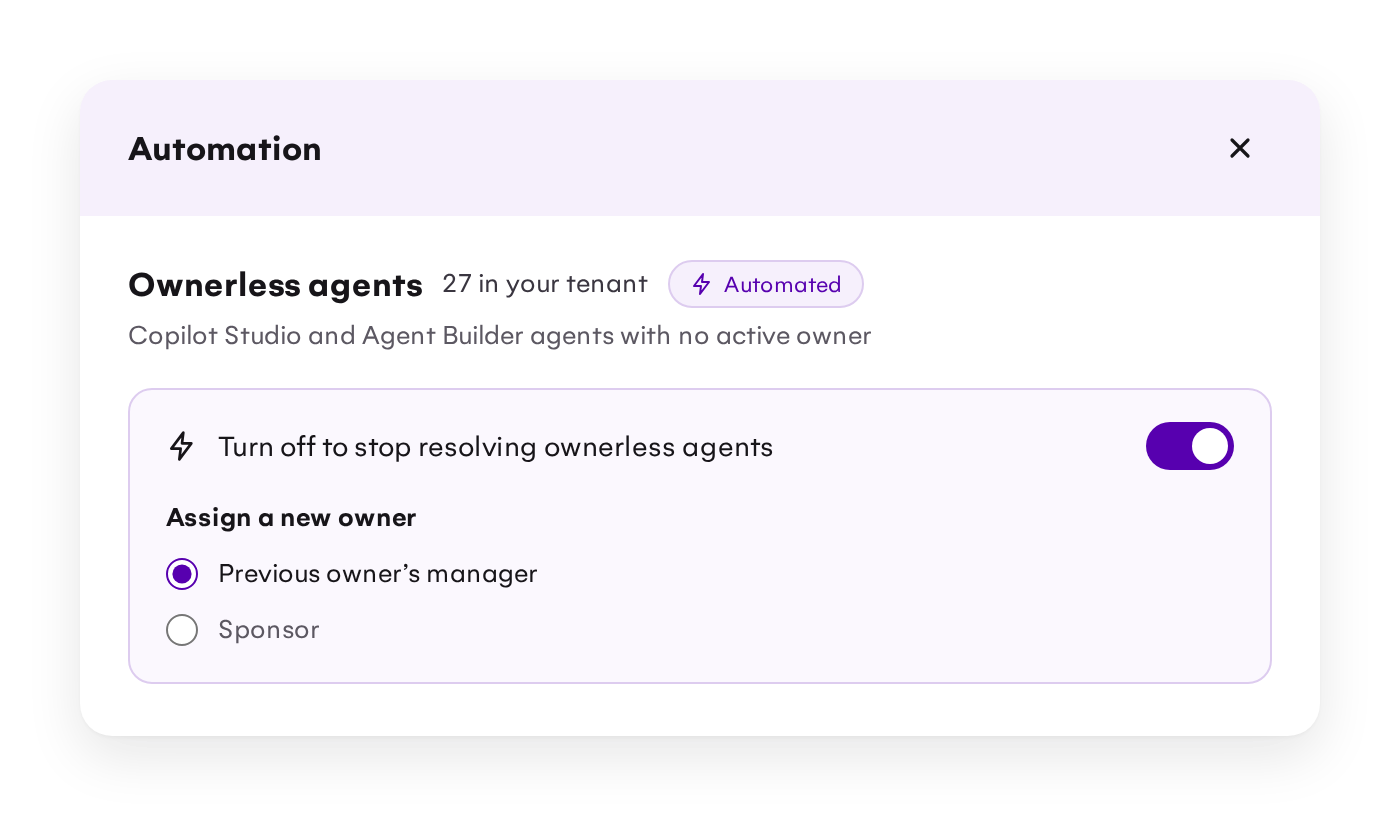
New owners get one email per previous owner, listing every agent they received. If there’s nobody to assign an agent to, it stays ownerless so IT admins can resolve it themselves.
As a result, every active agent has an accountable owner, nobody fixes agents by hand, and managers decide who should keep what. This feature in Point covers both Copilot Studio and Agent Builder agents, and you don't need an Agent 365 license.
Audit reports: know what changed on your agents and assistants
Knowing which agents and assistants exist is only the first step. Until now, tracking what happened to them meant piecing together audit logs from several Microsoft admin centers. Activity tracking stopped at files, and showing an auditor who changed an agent was slow, manual work. Two new reports bring it all into Point:
-
Configuration changes report: see who changed an agent’s or app’s configuration, what changed, and when. Spot unexpected changes early and trace each one back to the person who made it.
-
Activity report: see which files agents and assistants touched, who they acted for, and their sign-in activity.
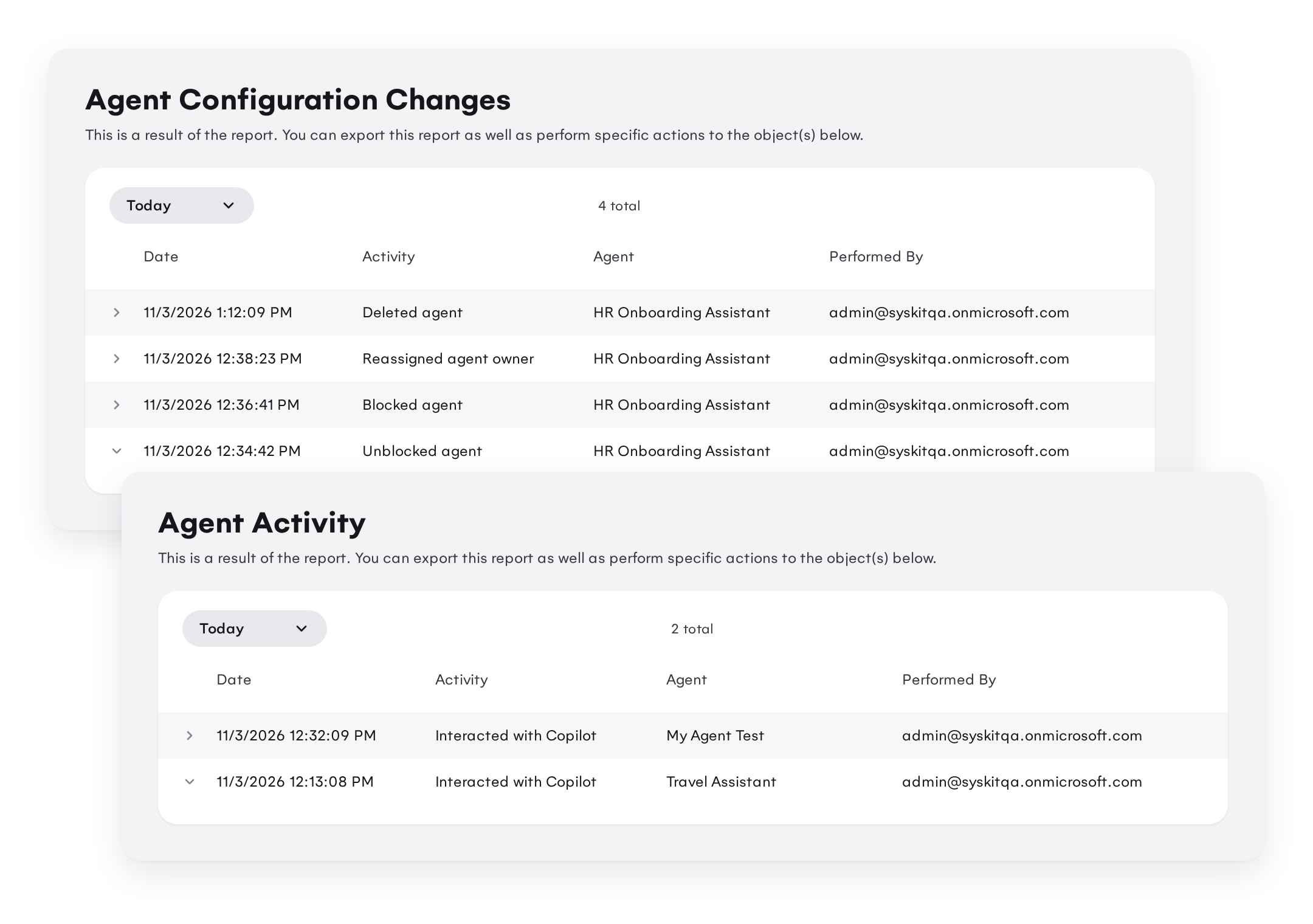
When something looks off, you can trace it back to who, what, and when in one place. And when auditors or leadership ask, you have the evidence ready.
Agent governance starts with your content
Syskit Point doesn’t stop at the agents. Because agents inherit the permissions and the clutter of the content they use, Point keeps that content in shape continuously.
-
See who else can open what each agent uses. For every knowledge source, Point shows the users, groups, guests, and sharing links with access.
-
Workspace reviews ask owners of Teams and sites to confirm who should still have access, so agents don’t pass on oversharing.
-
Stale file policies find files nobody has touched in years and move them to Microsoft 365 Archive, where Copilot no longer uses them. Your agents answer from current content, not outdated drafts.
Point governs agents, permissions, sharing links, workspaces, and storage in one place.
With or without Agent 365, Syskit Point fits
No Agent 365 license? Point works without it. You get your agents’ inventory, actions, and history in one place, automatic owners for ownerless agents, and governance for the content behind them. No Agent 365 or E7 needed.
Already on Agent 365? Point complements it. Agent 365 governs the agents; Point also governs the content they use. It covers the agents Entra lifecycle policies can’t see, reassigns owners of Copilot Studio agents too, and does it without an admin running a rule each time.
Already a Syskit Point customer? Your agents and AI assistants show up in the same Point you already use for permissions, workspaces, and storage, right next to the content they access.
Coming soon: Inactive agents automation
Now that every agent has an owner who can decide whether to keep it, the next step is removing the agents nobody uses.
With the upcoming inactive agents automation, Point will delete unused agents after a grace period you set. During that period, the agent is either blocked or left as it is. Owners can get an email with a Keep button that stops the countdown, and you’ll see how many agents were reassigned, blocked, deleted, and kept.