The end of SharePoint OTP: Why ad hoc external users no longer exist, and how to respond
Table of contents
|
TL;DR |
Microsoft is retiring SharePoint One-Time Passcode (OTP) authentication for external sharing in SharePoint and OneDrive. Since May 2026, every file or folder you share with someone outside your organization creates a Microsoft Entra B2B guest account. Between October 1 and October 31, 2026, the old passcode flow stops working, and external recipients who never received a guest account lose access to the links you shared with them in the past. The fix is small (one reshare restores everything), but only if you know who is affected.
If your tenant has been around for a few years, you probably have a category of external user that you can't see in Microsoft Entra ID at all. Microsoft calls them ad hoc external recipients. Having worked with SharePoint environments for over a decade, I've watched external sharing go through several identity models, and this is the change that finally leaves one answer to "who is this person?" for every authenticated outsider. Here is what is changing, what happens under the hood, and how to find your affected recipients before the deadline.
Three ways an outsider could reach your content
Until this year, SharePoint and OneDrive supported three kinds of external access:
-
Microsoft Entra B2B guests. A guest is a real object in your directory, with a user principal name like jane_partner.com#EXT#@contoso.onmicrosoft.com and a userType of Guest. Guests can be members of groups and teams, they sign in through Microsoft Entra ID, and your Conditional Access policies apply to them.
-
Ad hoc external recipients. When someone shared a file or folder with a "specific people" link to an email address with no matching account, SharePoint created a lightweight, SharePoint-only identity instead. The recipient proved who they were by typing a code that SharePoint emailed to them. No object was created in Microsoft Entra ID. Inside the site, the account shows up with a login name like i:0#.f|membership|urn:spo:guest#jane@partner.com, invisible to every identity control you own.
-
Anyone links. Anonymous links that work for whoever holds them. No identity at all, and not part of this change.
Microsoft's own documentation compares the two authenticated types, and the table explains the decision better than the announcement does:
| Microsoft Entra B2B guest | Ad hoc external recipient | |
| How they prove identity | Sign in to Microsoft 365 | Enter a single-use code sent to the shared email address |
| Actions are audited | Yes | Yes |
| Can be a member of groups and teams | Yes | No |
| Can edit in Word, Excel, PowerPoint, and other Microsoft 365 apps | Yes | No |
| Covered by Conditional Access | Yes | No |
That last row is the whole story: an identity that Conditional Access cannot see is an identity you cannot protect, so Microsoft is collapsing the middle tier.
What is retiring, and what is not
This is the point that causes the most confusion, so let's be precise.
SharePoint OTP is retiring. The code that SharePoint itself generated and validated for ad hoc external recipients is going away, together with the SharePoint-only identities behind it. Microsoft's Message Center post MC1243549 abbreviates it as SPO OTP.
Email one-time passcode in Microsoft Entra ID is staying. When a guest has no work or school account, no Microsoft account, and no federated identity provider, Microsoft Entra ID falls back to emailing them a one-time passcode. This feature is on by default in every tenant that hasn't explicitly turned it off. The difference is that the code now comes from Microsoft Entra ID, the session is tied to a guest account in your directory, and your policies apply.
The short version: one-time passcodes as an authentication method are not retiring; the SharePoint-only identity that used them is.
The timeline, including what already happened
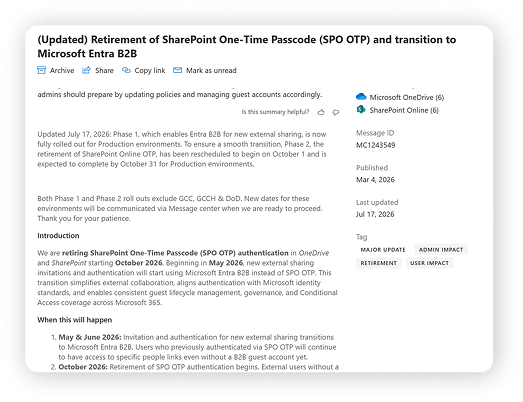
Microsoft announced the retirement on March 4, 2026 and later moved enforcement from July to October, so anything you read earlier this year probably shows the old dates.
| Date | What happens |
| 2021 to 2023 | The SharePoint and OneDrive integration with Microsoft Entra B2B ships as an opt-in tenant setting (EnableAzureADB2BIntegration) in 2021. Tenants created after June 2023 get it by default. |
| July 1, 2025 | Tenants that had already enabled the integration see their remaining OTP links stop working. Resharing is required for that group. |
| May to June 2026 | Phase 1. New external shares create Microsoft Entra B2B guests in every tenant. EnableAzureADB2BIntegration no longer controls anything, and the option to disable the integration is removed. Existing OTP links keep working. Microsoft confirmed completion for production environments on July 17. |
| October 1 to 31, 2026 | Phase 2. SharePoint OTP authentication retires. External recipients without a matching guest account get an access denied message on previously shared "specific people" links. |
| To be announced | GCC, GCC High, and DoD environments. Both phases exclude them for now. |
There is no opt-out, and tenants can't choose their own date.
What changes under the hood
With the deadline approaching, it's worth knowing exactly what changes in your tenant.
First, provisioning moves to the Microsoft Entra B2B Invitation Manager. When a user shares a "specific people" link with a new external email address, SharePoint asks Microsoft Entra ID to create the guest at share time. The guest appears in your directory immediately with an invitation state of pending acceptance, and stays that way until the recipient opens the link and redeems the invitation.
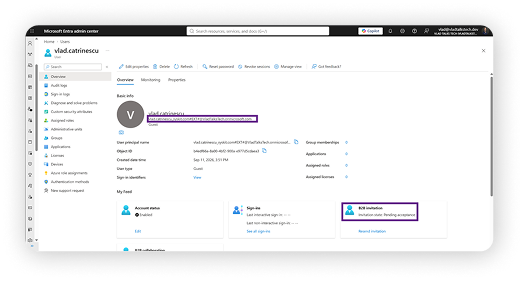
Redemption follows the Microsoft Entra order of identity providers. During invitation redemption, Microsoft Entra ID checks for a work or school account, then SAML/WS-Fed federation, then Google federation, then a Microsoft account. If none match and email one-time passcode is enabled, the recipient gets a code by email. On the first sign-in they also consent to your privacy statement, so make sure the privacy statement URL is set in Microsoft Entra ID.
Sessions, codes, and policies are Microsoft Entra's. An emailed passcode is valid for 30 minutes and a session lasts 24 hours; the SharePoint setting "People who use a verification code must reauthenticate after this many days" no longer applies. Conditional Access covers these guests like any other, with one caveat from Microsoft's documentation: authentication strength policies can't be applied to email one-time passcode accounts, so use the "Require multifactor authentication" grant control for that population.
Audit moves too. Authentication events and guest lifecycle actions now land in the Microsoft Entra sign-in and audit logs rather than SharePoint's OTP logs.
What happens to the external users you already have
Existing recipients fall into two groups, and Microsoft's FAQ on the change is clear about both.
Recipients who already have a guest account see no change. If the same email address was ever invited to a team, added by an admin, or received a site share, SharePoint reuses that guest. No duplicates are created.
Recipients who only ever received file or folder shares through SharePoint OTP keep their access until Phase 2. From October 1, 2026, they get an access denied message on old links, and nobody is notified automatically, which is why Microsoft asks you to inform your users ahead of time.
Restoring access is simple. Either someone with the Guest Inviter or User Administrator role creates the guest in Microsoft Entra ID with the same email address, or any internal user with permission shares or reshares at least one file, folder, or site with that address. Both actions create the guest, and that guest restores access to everything previously shared with the email, not just the new item.
Anyone links are unaffected, because they never involved an identity. Site sharing and Microsoft Teams guest access were already running on Microsoft Entra B2B. The leftover urn:spo:guest# entries in site user lists don't disappear on their own, but after October they can no longer authenticate; removing them is housekeeping, not a security task.
Three settings to check now
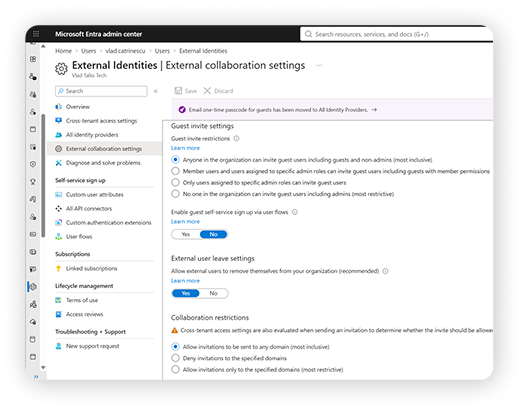
The practical impact of Phase 1 is that Microsoft Entra external collaboration settings now apply to every file and folder share, not only to site and team sharing. Three of them bite immediately.
- Guest invite settings (Microsoft Entra admin center, External Identities, External collaboration settings) . If invitations are limited to administrators or the Guest Inviter role, regular users can no longer share files with new external addresses. They see "Unable to get the link. Please try again later." The underlying error is "Guest invitations not allowed for your company." Decide who may create guests, and assign the Guest Inviter role deliberately if you keep the setting strict.
- Email one-time passcode (Microsoft Entra admin center, External Identities, All identity providers) . Keep it enabled if you have partners without Microsoft accounts. Turning it off forces them to create a Microsoft account.
- Two domain lists. The Microsoft Entra allow or deny list now applies to file sharing alongside SharePoint's "Limit external sharing by domain" setting, and where Microsoft Entra is more restrictive, it wins. If you consolidate into the Microsoft Entra list, remember it also governs Microsoft Teams and Microsoft 365 Groups.
Cross-tenant access settings, guest access expiration, and the "Existing guests" sharing level deserve a look as well. I'll cover the full list, and the guest lifecycle that comes with it, in a follow-up post.
Find your affected recipients
Microsoft recommends two methods, and the community has added a faster third.
Method 1: Site sharing report
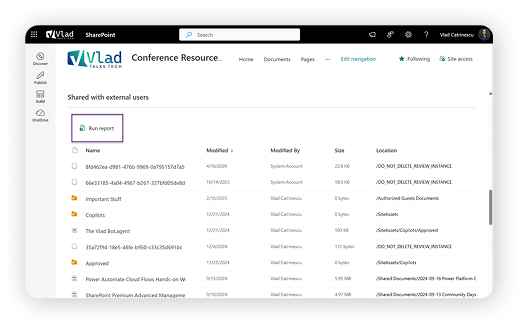
On any site, open Settings, Site usage, and under Shared with external users select Run report (OneDrive has the same report under OneDrive settings, More settings). The CSV report lists every user and link on the site; look at the User E-mail and User or Group Type columns for external addresses that don't correspond to a guest in your directory. Fine for a handful of sites, painful for hundreds.
Method 2: Microsoft Purview audit
SharePoint OTP sign-ins are logged with the operation EmailAuthOTPAuthenticationSucceeded. Searching the last 180 days in the Microsoft Purview audit log tells you which ad hoc recipients are still actively opening your content, which is the list that matters most.
Method 3: Query the site user list directly
Every SharePoint site keeps its own user list, and ad hoc recipients carry a property called IsEmailAuthenticationGuestUser. With PnP PowerShell connected to a site, one REST call returns them:
Loop that across Get-PnPTenantSite -IncludeOneDriveSites (SharePoint Administrator, or an app registration with application permissions to all sites) and you have a tenant-wide inventory. Credit where it's due: Tobias Asböck published a complete script for identifying and migrating SharePoint OTP users that combines the site inventory with the Purview query and flags which recipients already have a Microsoft Entra account. Use it rather than writing your own.
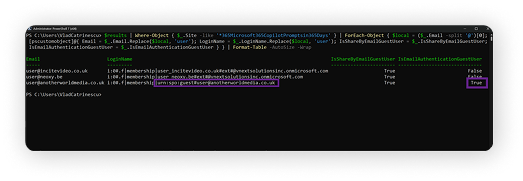 Output anonymized for the screenshot; in your tenant you'll see the full email addresses. Note that IsShareByEmailGuestUser is True on all three rows: every one of them came through the share dialog, and only the identity type differs.
Method 4: Use Syskit Point
Syskit Point already holds both data sets above (the per-site user lists and the audit log) and joins them for you. Its external users report shows every ad hoc external recipient across the tenant, which sites and files each one can access, and when they last opened anything. Filter to users active in the last 180 days, and you have your list of guests to create. Filter to inactive users, and you have your cleanup list, which you can clear in bulk directly from the report. You get the same result as the script without having to run it, and the data stays current after October.
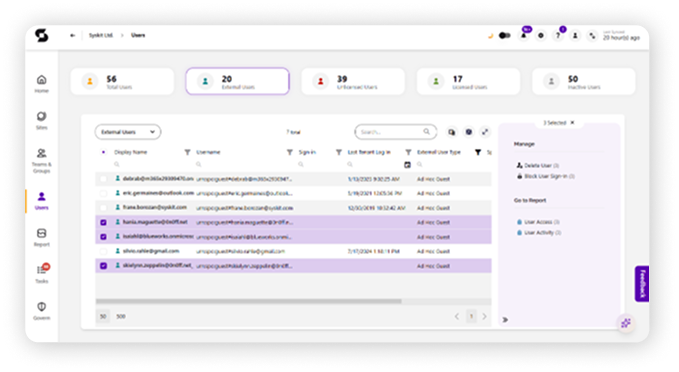
Once you have the list, decide per recipient. If they still need access, create the guest proactively so nothing breaks in October. With Microsoft Graph, that is a single POST to the invitations endpoint with the recipient's email and sendInvitationMessage set to false, since they already hold the original sharing link and redeem the invitation the next time they open it.
If they don't need access anymore, do nothing. Their old links stop working in October, which is usually the outcome you want. The exception is the external party who shows up once a year, such as an auditor or a renewal partner. They will hit the access denied message months from now, so make sure whoever owns that relationship knows a single reshare fixes it.
What your external recipients will see
A recipient with a work or school account signs in with it. A recipient without any Microsoft identity clicks Send code, receives the emailed passcode, and enters it. Everyone sees a consent screen on the first sign-in, and recipients who were used to staying signed in for days under the old flow will notice the 24-hour session.
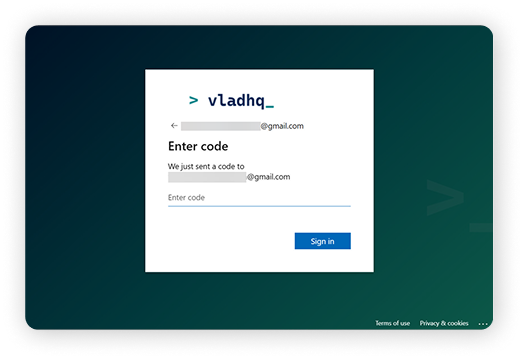
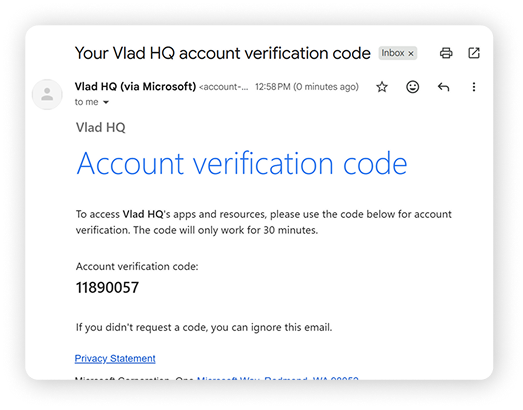
The friction point is multifactor authentication. If your Conditional Access policy requires MFA for guests (and I'd recommend it does), a recipient who only has an email address will be asked to register an authentication method in your tenant the first time they sign in. Partners from other Microsoft Entra tenants can be spared this by trusting their home tenant's MFA claims in cross-tenant access settings. Email-only recipients cannot, at least until passkey support for B2B users, announced for October 2026 onward, reaches external users. Tell your users that the first open takes a minute longer than it used to.
Your checklist for October
- If you haven't already: test the new flow now by sharing with an external address and confirming a guest appears in Microsoft Entra ID.
- Review who can invite guests, the email one-time passcode toggle, and both domain lists.
- Inventory ad hoc recipients with the site user query and the EmailAuthOTPAuthenticationSucceeded audit search, or from the external users report if you run Syskit Point.
- Create guests proactively for recipients who still need access. Let the rest expire.
- Brief your helpdesk on the two symptoms: access denied on old links, and "Unable to get the link" where invite settings are strict.
- Tell your users the October dates and the one-reshare fix. If you run GCC, GCC High, or DoD, follow MC1243549 for your dates.
If you haven't already: test the new flow now by sharing with an external address and confirming a guest appears in Microsoft Entra ID.
Where Syskit Point fits
The inventory step from the checklist is the one part of this migration that doesn't scale when done by hand, and it's exactly what Point handles out of the box. The more interesting part starts after October: every external recipient becomes a guest in your directory, and guests pile up over time. With Point's guest reports, owner-driven access reviews, and automated removal of guests nobody has confirmed, you can keep that from turning into your next cleanup project.