





Menu Close

SharePoint provisioning: Let users create. Give IT an environment they can actually manage 

When literally anyone can create a SharePoint site or Teams workspace without templates, ownership, or approval steps, you already know where it ends: a cleanup project nobody wanted. Syskit Point automates SharePoint provisioning so every workspace starts governed. And IT never inherits the mess.

Sign up for your 21-day free trial. No credit card is required.

Trusted by

IBM
Coca Cola
IATA
Lionsgate
Alfac
LEGO

SharePoint sites and Teams are easy to create. Make sure every workspace starts governed.

M365 is designed to make collaboration fast and accessible, and it delivers on that. The problem is where it leads: abandoned workspaces, sites nobody owns, and a cleanup project in a couple of years that nobody wanted.

Syskit Point adds the governance layer that keeps pace, so every workspace starts with the right owner, template, and policies already applied. 
PROVISIONING-control-M365-workspace-creation-1

See it in your environment

Book a 20-minute call and we'll show you how Syskit Point governs SharePoint provisioning from the first request to expiration; no slides, just your questions.

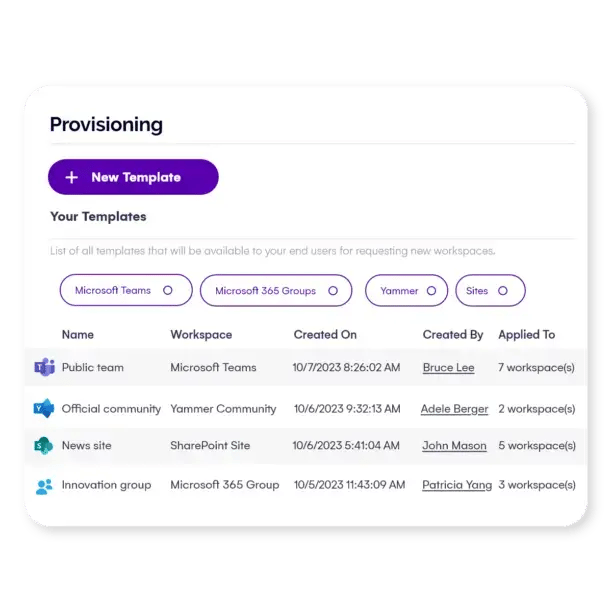
Choose from predefined templates or build your own for Teams, SharePoint sites, Groups, and Viva Engage communities.

Every SharePoint site provisioning request and Teams workspace creation runs through a template that automatically enforces naming conventions, sensitivity labels, sharing settings, and ownership requirements. Templates can be scoped by department, location, or Azure AD property, so the right configuration reaches the right teams without IT involvement. No manual setup, no exceptions, no cleanup later. 


Users submit workspace requests directly through the Syskit Point Teams app: the same place they already work. IT defines the rules once: how many approval stages, what ownership is required, which teams can access which templates, and whether requests auto-approve or route for review. Once configured, every request is processed automatically. Users get what they need without a support ticket or another unnecessary meeting.


IT gets a governed environment without reviewing every request. Built-in duplicate detection means users can see if a workspace already exists before submitting, keeping the environment clean from the start.


Provisioning is where governance starts. Once a workspace is live, Syskit Point applies policies continuously: access reviews ensure the right people have access, guest recertification keeps external users from retaining access indefinitely, and sensitivity enforcement keeps labels aligned with the content inside.


When a workspace gets abandoned, owners are automatically prompted to keep it, archive it, or delete it. No IT involvement required. The environment stays clean, compliant, and audit-ready, without anyone manually tracking down unused workspaces.

Syskit Point Teams app gives users a single, familiar place to request workspaces, check for duplicates before creating, track request status, and approve requests from others, all without leaving Teams.

For IT, governance happens in the tools users already use every day, which drives adoption and eliminates workarounds. No new interface to learn, no portal to navigate, no separate system to maintain. Requests come in structured. Governance runs automatically. Everyone stays in Teams.

How Syskit Point governs every M365 provisioning request

Templates

Every workspace, built to spec

Choose from predefined templates or build your own for Teams, SharePoint sites, Groups, and Viva Engage communities.

Every SharePoint site provisioning request and Teams workspace creation runs through a template that automatically enforces naming conventions, sensitivity labels, sharing settings, and ownership requirements. Templates can be scoped by department, location, or Azure AD property, so the right configuration reaches the right teams without IT involvement. No manual setup, no exceptions, no cleanup later. 


Self-service

Users request. Governance runs. IT isn't in the middle. 

Users submit workspace requests directly through the Syskit Point Teams app: the same place they already work. IT defines the rules once: how many approval stages, what ownership is required, which teams can access which templates, and whether requests auto-approve or route for review. Once configured, every request is processed automatically. Users get what they need without a support ticket or another unnecessary meeting.


IT gets a governed environment without reviewing every request. Built-in duplicate detection means users can see if a workspace already exists before submitting, keeping the environment clean from the start.


Lifecycle

Governance that follows every workspace

Provisioning is where governance starts. Once a workspace is live, Syskit Point applies policies continuously: access reviews ensure the right people have access, guest recertification keeps external users from retaining access indefinitely, and sensitivity enforcement keeps labels aligned with the content inside.


When a workspace gets abandoned, owners are automatically prompted to keep it, archive it, or delete it. No IT involvement required. The environment stays clean, compliant, and audit-ready, without anyone manually tracking down unused workspaces.

Teams app

Built where your users already work

Syskit Point Teams app gives users a single, familiar place to request workspaces, check for duplicates before creating, track request status, and approve requests from others, all without leaving Teams.

For IT, governance happens in the tools users already use every day, which drives adoption and eliminates workarounds. No new interface to learn, no portal to navigate, no separate system to maintain. Requests come in structured. Governance runs automatically. Everyone stays in Teams.

What governed SharePoint provisioning looks like in practice

Robert-Preskar-Rimac

Robert Preskar

Head of IT Projects, Rimac Group

"We needed to disable the basic functionality of creating a new team in Teams and implement a new request and approval process for opening a new team." 

STADA

Mischa Dillmann

Global IT Director Digital Workplace Services, STADA

"The automated provisioning process gave us control over naming conventions and reduced the risk of data sprawl, data leaks, and misalignments with Microsoft security best practices by 70%."  

Elton Kuttschreuter, Lotus

Elton Kuttschreuter

DevOps Lead Engineer, Lotus Cars

"Syskit Point is a must-have for organizations looking to simplify M365 governance while enhancing security and compliance." 

Ready to give your users the workspaces they need, and IT an environment they can actually govern?


Book a 20-minute call with our team. We'll walk you through how Syskit Point automates SharePoint and Teams provisioning, and what governance at the point of creation looks like for an environment like yours.