
Menu Close

View and manage user permissions from one central point

Microsoft 365 is flexible in managing collaboration, but the user access and permissions reporting options are cumbersome and slow.

Data breaches happen instantly, and it’s hard to detect who’s behind them. Syskit Point allows you to see who has access to what and if there are any unique permissions for a specific object.

Detect and manage who can access what across Microsoft Teams (private and shared channels included), Groups, SharePoint sites, and OneDrive accounts.

See all sharing and access down to the file level and generate real-time reports in just a few clicks.

See all Syskit Point’s reports examples.

Drill down into user permissions and memberships across the entire tenant.

Easily offboard people who leave or switch departments.

Add, copy, or transfer permissions for multiple users at once.

See all Syskit Point’s reports examples.

List all your content across your M365 where permissions differ from a parent.

Restore permissions inheritance directly from the report.

See all Syskit Point’s reports examples.

Real-time, highly detailed reports

Opt for a tenant-wide view or choose several individual workspaces that you wish to include – entirely up to you. And instantly generate and export your reports.

Permissions matrix report

Detect and manage who can access what across Microsoft Teams (private and shared channels included), Groups, SharePoint sites, and OneDrive accounts.

See all sharing and access down to the file level and generate real-time reports in just a few clicks.

See all Syskit Point’s reports examples.

User access report

Drill down into user permissions and memberships across the entire tenant.

Easily offboard people who leave or switch departments.

Add, copy, or transfer permissions for multiple users at once.

See all Syskit Point’s reports examples.

Unique permissions report

List all your content across your M365 where permissions differ from a parent.

Restore permissions inheritance directly from the report.

See all Syskit Point’s reports examples.

Control external access and excessive content sharing

Uncontrolled external sharing is among the biggest threats to your data safety. With Syskit Point, you can prevent data breaches by gaining complete clarity and straightforward external user access and sharing management.

Easily export reports showing the following:

  • External and guest users – get a detailed report with all the membership and access information for external and guest users in your tenant.
  • Externally shared content – Externally shared content, including Microsoft Teams files and private channels, Microsoft 365 Groups sites, SharePoint sites, and OneDrive.
  • Sharing links – Anonymous links, links for specific people, and sharing links within your company. Remove all links and stop sharing access with a single click.
  • Valuable details – Valuable details include the dates when the sharing links were created, when they expire, and what access rights they give.

Catch risky activity early with detailed audit logs

Get an overview of all user and administrative actions from multiple admin centers in one place.

Keep track of every permission, workspace, configuration change, and user and admin activity – with the option to retain data for more than 90 days.

Provide more visibility to your support team and impress external auditors with the click of a button. Explore Syskit Point’s auditing.
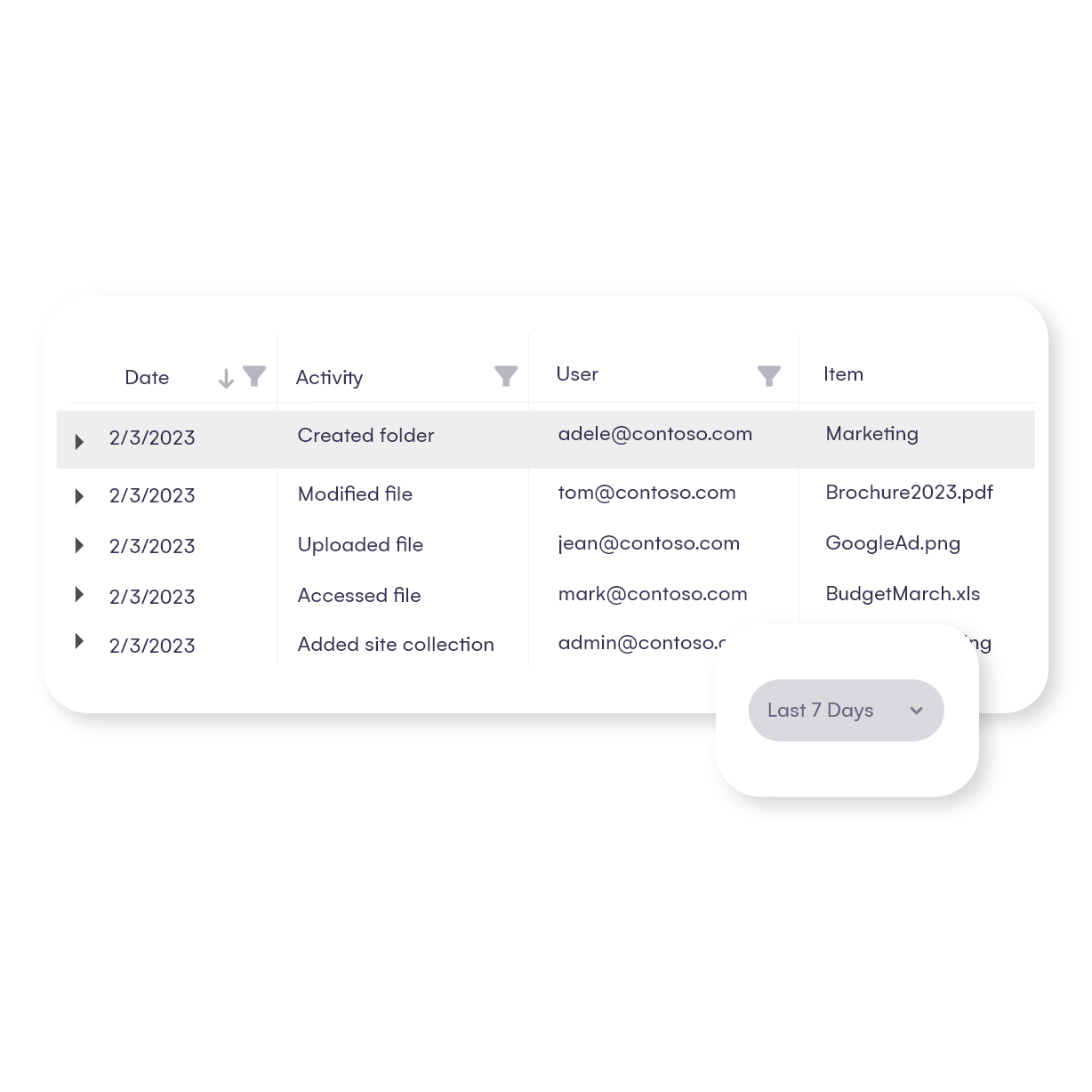
Have a look at Syskit Point’s report examples:

Catch risky activity early with detailed audit logs

Storage management insights & optimization

Gain complete visibility over trends and resources that take up storage so you don’t get caught off guard. Get the tools to optimize SharePoint storage, identify cost-saving opportunities, and make timely informed decisions.

  • Start with a tenant-wide graphical overview of SharePoint storage usage over time so you can easily identify unusual spikes and then dig deeper into the Site and File details.
  • Explore file versions, sizes, extensions, and more for each file to discover potential storage cleanup and savings areas.
  • Stay proactive by setting up a policy to receive a notification once you get close to the tenant storage quota limit you’ve set up.
  • The calculator shows how much storage you can save per site if you delete certain file versions. Free up storage space with just a few clicks.
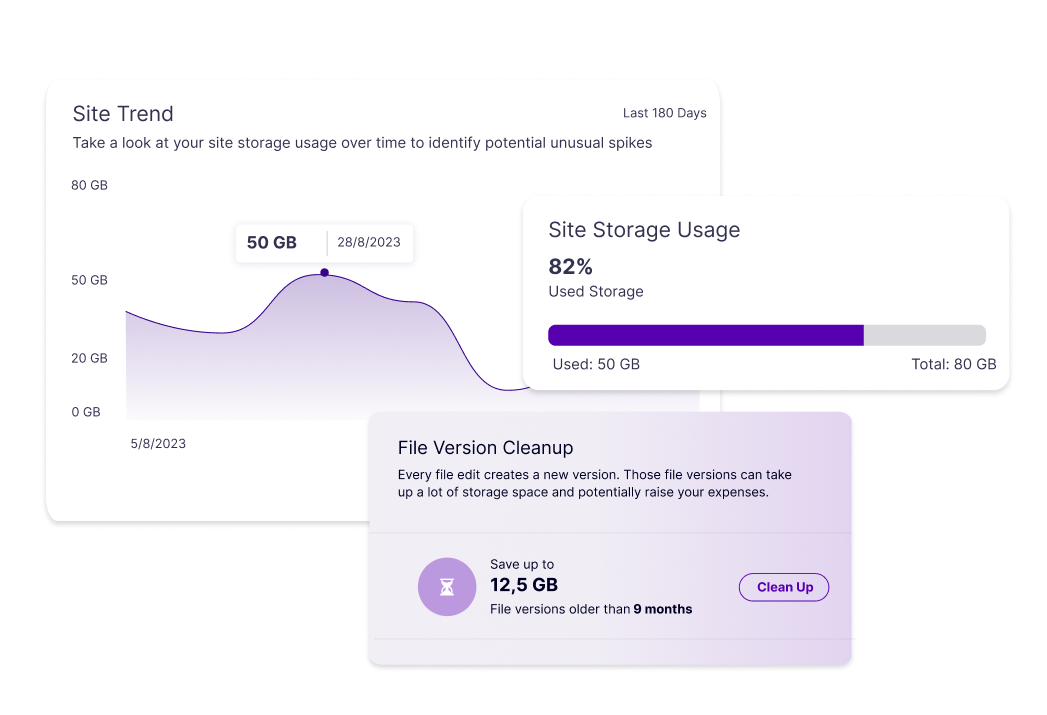
Storage management insights & optimization

Full Power Platform visibility

Avoid operation disruptions, using outdated solutions, extra costs, and security and compliance risks.​

  • Inventory Reports – discover all Environments, Flows, Apps, PowerBI, and Connections along with ownership and usage information. With these reports, you can understand connections in Power Automate to avoid exposing sensitive data or using outdated setups.​ And, you can also detect premium resources for cost optimization.
  • Cleanup Views and Actions  – avoid sprawl, identify inactive or orphaned flows and apps before they cause disruptions. Evaluate their relevance and take action — whether that means re-assigning ownership or removing unused apps and flows.​
  • Permissions – check every role and permission for each Power App, Flow, and Power BI in your tenant. Syskit Point allows you to detect external users and list them all in a user-friendly format.
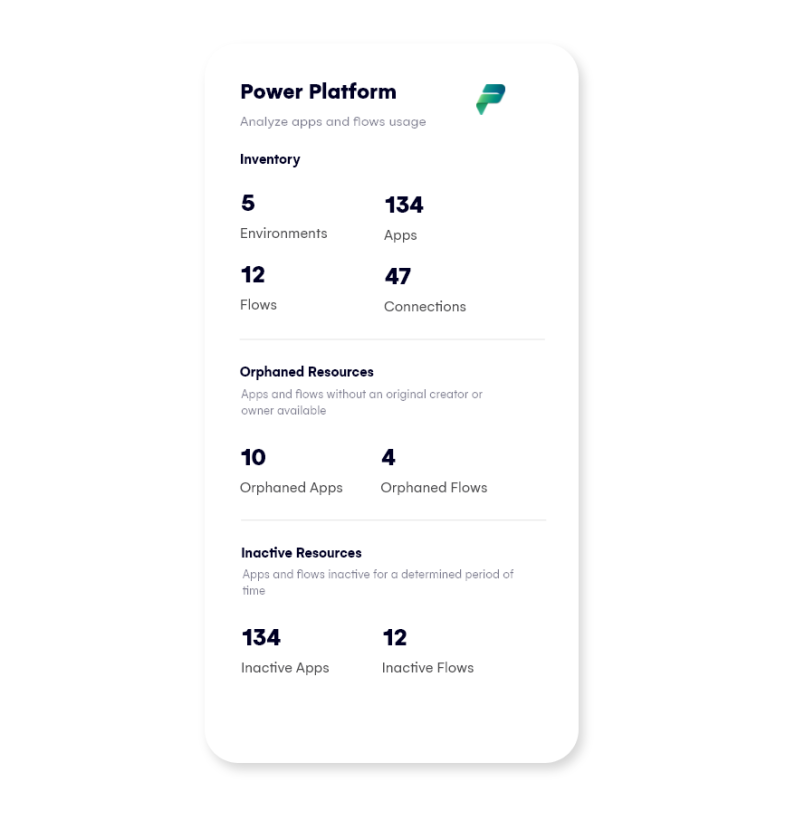
Full Power Platform visibility

Keep track of orphaned users and resources

Clutter causes confusion and decreases productivity. With Syskit Point, you can ensure that your tenant runs smoothly and efficiently.

Here’s how Syskit Point can help you keep your environment clean:

  • Identify all orphaned Microsoft 365 Groups and Microsoft Teams – manage their owners.
  • Find all sites with disabled or deleted owners – remove orphaned users .​
  • Discover all inactive content and keep your Microsoft 365 environment well-organized.

Optimize Microsoft 365 licensing costs and maximize your ROI

If you aren’t aware of your license usage, chances are you’re leaving money on the table.

Syskit Point’s License Optimization add-on provides complete visibility into Microsoft 365 license usage so you can eliminate waste, reduce costs, and maximize ROI.

Find the total cost of all current licenses, optimize their use, and achieve real savings.

  • Remove license from inactive users with assigned licenses.
  • Reclaim unused add-on licenses such as Power BI, Visio, and Copilot by removing them from inactive users and reassigning them to users who will fully utilize their value.
  • Remove redundant licenses (for example, E5 and Power BI Pro do not need Power BI Pro because E5 already includes it).
  • Understand license consumption breakdown by your internal teams to support accurate internal invoicing and budgeting.
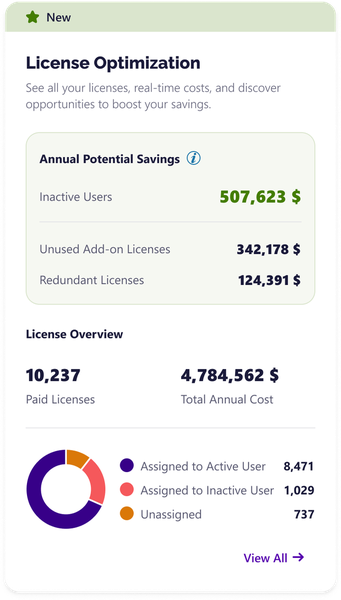
Optimize Microsoft 365 licensing costs and maximize your ROI

The Syskit Point advantage

Features Syskit Point Microsoft 365
 
Report on Microsoft Teams, Microsoft 365 Groups, OneDrive, and SharePoint sites from a single reporting center N/A
Inactive teams, groups, and sites  N/A
Orphaned users and group detection  N/A
Site structure reports N/A
Private channels reporting and management Yes, available for multiple teams Only with admin roles
Usage analytics and trends Yes, available for multiple teams, sites, and groups (for up to 1 year) Only in the scope of one site/group (for up to 90 days)
Access reporting
Comprehensive, matrix-like, access reports N/A
User's memberships and access in a single report N/A
Content shared with external and anonymous users Yes, available for multiple sites and groups Only in the scope of one site/group
Items with access different from their parents Yes, available for multiple sites and groups Only in the scope of one object
Users with privileged access N/A
Report on access for an individual OneDrive
License reporting
License overview
License distribution by department N/A
License distribution by country N/A
Licenses assigned to inactive users N/A
Sharing reporting
Content shared with external and anonymous users Yes, available for multiple sites and groups Only in the scope of one site/group

Audit it all from a single point

Stop wondering about the state of your Microsoft 365 environment with Syskit Point’s insightful reporting.