Menu Close

Dig into SharePoint analytics

Apply governance rules on a regular basis, automate routine checks, and ensure regulatory compliance at all times:

  • Determine the type of rule you wish to apply.
  • Set up configuration details.
  • Select a target to apply the rule.
Dig into SharePoint analytics

The available rules with SPDockit

  • Attachments – Specify if users can attach files to items in a list.
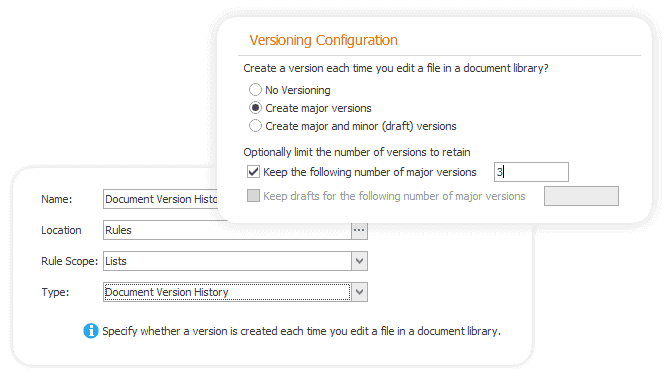
  • Document version history – Decide if a document version gets created each time you edit a file in a document library.
  • Folders – Determine if the “New folder” command is available.
  • Opening documents in the browser – Decide if browser-enabled documents should be opened in the client or browser by default when the user clicks on them.
  • Quick edit – Specify if quick edit can be used on a list to bulk edit data.
  • Require Check Out – Determine if users must check out documents before making changes in a document library.

Easily create queries and resolve specific problems

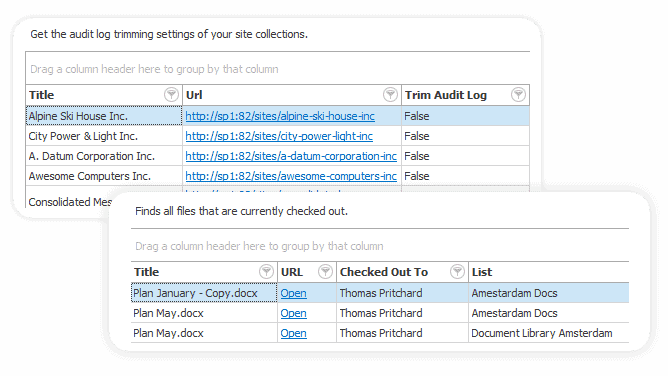
Create a query for a particular problem you are struggling with, save time and boost efficiency.

Effortlessly achieve the following:

  • Find document libraries without versioning or those that don’t require checkout.
  • List site collections in a read-only state or those with anonymous access enabled.
  • Find all the lists near the SharePoint list view threshold (with more than 4500 or 5000 items).
Easily create queries and resolve specific problems

The SPDockit advantage

Features
SPDockit
Microsoft
Customizable N/A
Automated execution and reporting N/A
Scheduled delivery N/A
One-click export N/A
Dashboard N/A

Tune your performance with SPDockit

Keep an eye on all the changes in your SharePoint environment and optimize for the future