Every IT Admin knows the importance of Microsoft 365 governance, but making an effective and clear action plan is a complex challenge.
Governance can often feel like a moving target. You’ve got auditors demanding evidence, policies lagging behind, and the risk of a compliance miss never far away. Without a structured plan, governance is a mess of disconnected settings, manual changes, unnecessary rising costs, and no documentation to back up big decisions.
However, there’s a better way! Our three-phased implementation lays a clear foundation and then builds in your controls, step-by-step. We’ll give you a roadmap to guide you through M365 governance, so you can take control of management, ensure nothing is missed, and have an evidence chain needed to demonstrate compliance.
A strong M365 governance checklist pays dividends. Your processes will be better organized, there’s a lower risk of data loss, and you can approach audit season with confidence.
Implementing a clear checklist turns compliance into a practical system for safeguarding information, controlling costs, and keeping every department accountable.
The combination of strategy, alignment, and assessment sets the stage for governance that actually works.
Everyone wants the option of granular control, and foundation work sets the rules for real progress.
Phase 2 is where the real work begins – transforming policy into practice and locking down risks in your Microsoft 365 environment.
Continuous compliance starts with automation. The best-run M365 environments turn manual checks into automatic routines, removing scrambled review processes that leave teams exposed.
Automation saves IT hours and ensures governance is a permanent shield, delivering reliable evidence for every audit. With the right tools, continuous protection is much easier to achieve than you might think!
For more granular information on managing M365, check out our Governance Handbook.
By following our implementation checklist, you’ve built a rock-solid framework. But remember that the manual tasks in Phase 3 – regular access reviews, workspace lifecycle management, and monitoring – never truly end.
These are ongoing, labor-intensive, and fraught with the potential for missed steps, overlooked aspects, and human error. Access reviews are especially difficult. Reviewers often lack context or get overwhelmed by irrelevant requests, leading to stalled reviews and inconsistent documentation. Keeping up and providing evidence for auditors, drags IT into time-consuming tracebacks and documentation sprints.
“Moving these checks from spreadsheets and email chains to automated workflows is the only way to truly prove your policies are enforced – and to reclaim hours spent on tedious, repetitive governance tasks.”
Danijel Cizek, Product Manager Team Lead at Syskit
Microsoft provides a powerful suite of native governance tools for Office 365, with each serving a specific piece of the puzzle.
“Remember – these solutions operate in isolation rather than as a unified system. IT teams still need to connect the dots by manually managing settings and workflows across admin centers, and piecing together audit trails from separate tools.”
Danijel Cizek, Product Manager Team Lead at Syskit
A fragmented approach consumes more effort than expected, making unified compliance and governance monitoring a major challenge for busy IT teams. The solution is found through automated governance.
This is where your governance checklist goes from tasks on a spreadsheet to a fully automated compliance system!
Syskit Point acts as your always-on governance assistant by taking care of the heavy lifting, surfacing risks, and creating a provable audit trail.
First, Syskit Point automates workspace reviews across your Microsoft 365 estate, extending oversight beyond simple permissions to include sharing links, privacy, sensitivity, and inactivity checks. Built-in scheduling and customizable review templates let organizations set policies for every workspace, so access is always up-to-date and documented. Owners receive targeted review tasks when it matters most.
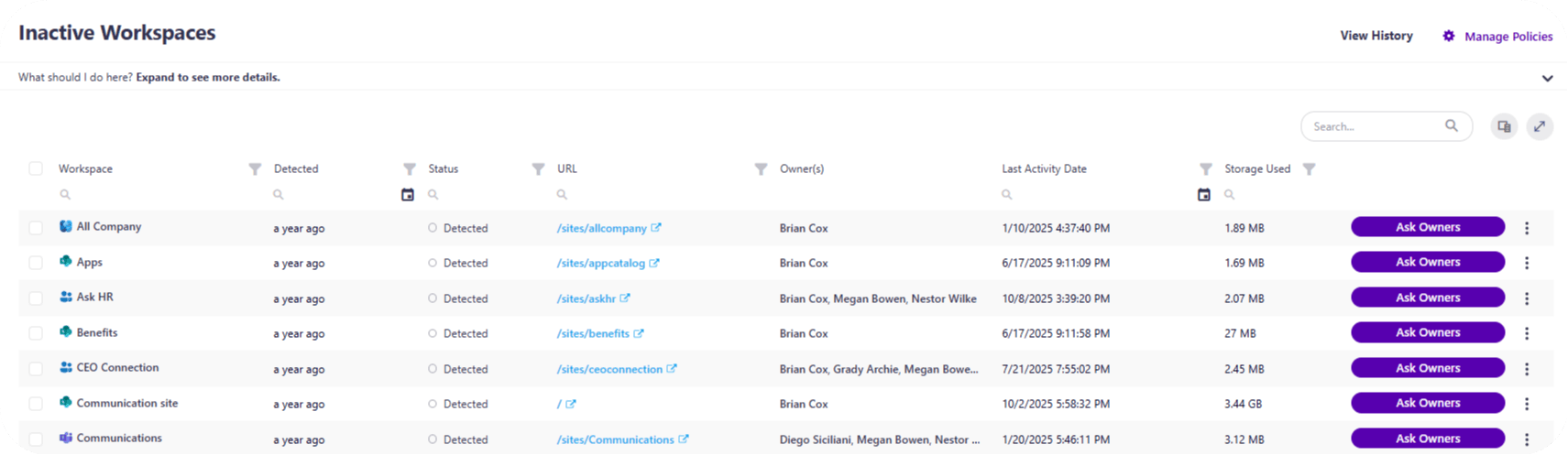
Next, Syskit Point manages the workspace lifecycle efficiently. Inactive Teams, Groups, or SharePoint sites are detected based on your defined policy. You can trigger archival or deletion actions, cutting through sprawl and reducing the risk of forgotten ghost teams with stale access.
But automation doesn’t stop there: Syskit Point’s alerting engine vigilantly monitors for suspicious behavior and policy violations – like unauthorized external sharing or privilege escalations – giving IT teams and business owners rapid insight and proactive control.
You’ll receive instant granular alerts about unlabeled workspaces, security and compliance vulnerabilities, the number of inactive M365 licenses at your disposal, and more.
Most importantly, Syskit Point turns your governance program into proof. All activities – access reviews, policy enforcement, lifecycle events – are recorded, timestamped, and exportable. For every audit or executive review, you now have centralized evidence, and no need for manual monitoring. For further info, browse through our Microsoft 365 Governance Handbook.
Effective M365 governance is a system with clear phases and repeatable actions. Although governance differs from one user’s needs to the next, a proper checklist transforms the theory into a workable process, replacing guesswork with confidence. But even the best manual plan still leaves too much to chance and consumes far too many hours.
Automation is the secret sauce. It shifts governance from periodic chores to continuous, provable compliance, where every protective control generates its own evidence. Users gain efficient, auditable, and secure operations all year round.
If you’re ready to turn your governance checklist into an automated compliance machine, see how Syskit Point can help you secure your M365 environment and simplify your next audit.