In the last few years, and especially the last few months, we are using Office 365 to collaborate within our organization on a much bigger scale than ever before. In the same way that we collaborate within our organization, we can work with users from external organizations, such as clients, vendors, and other partners.
Users can join groups, invite guests, connect to cloud apps, and work remotely from their work or personal devices. And this is the part where things can go sideways if there is no control over who is doing what, what is shared with whom, and who oversees what.
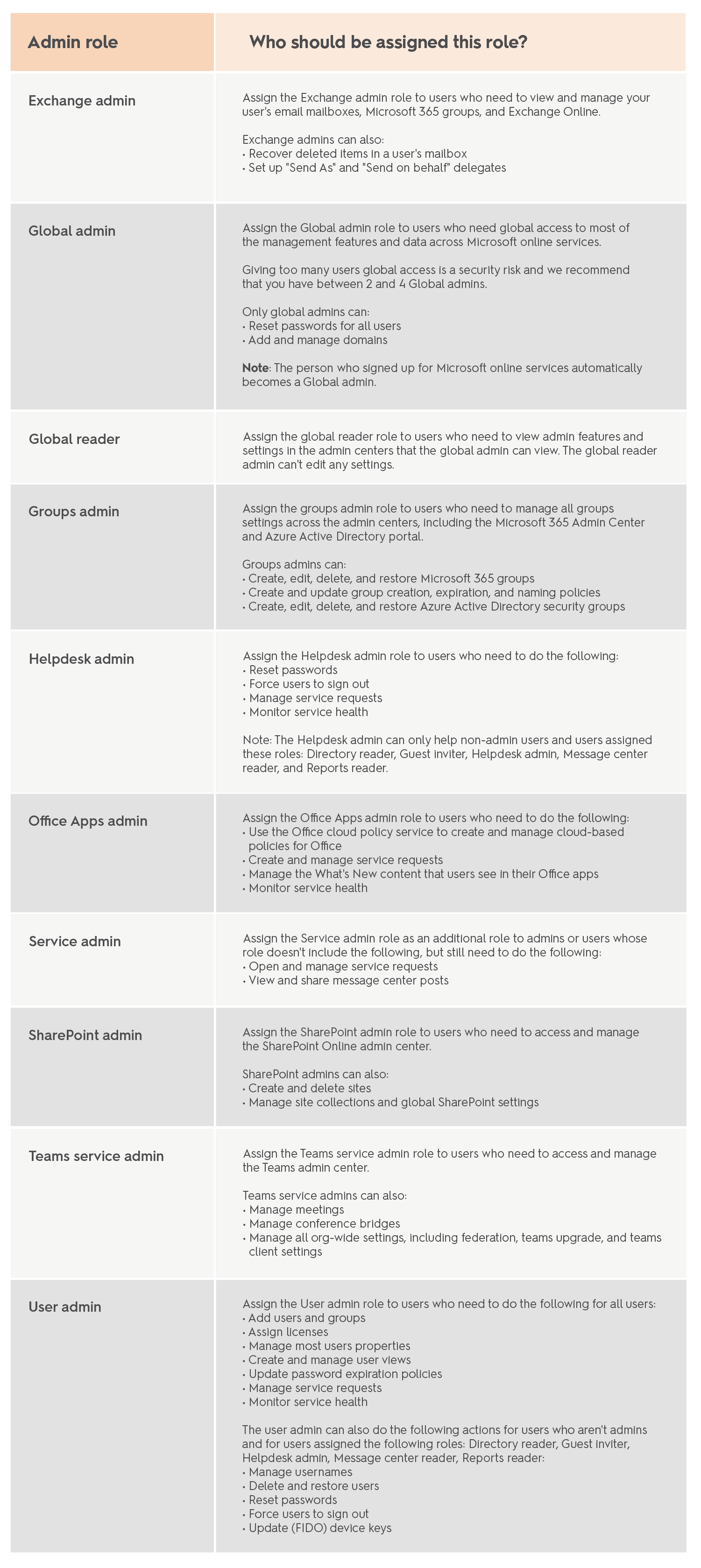
Let’s start with some basic terms. Roles play a significant part in Office 365 access management. This is the list of roles, provided by Microsoft that you will most likely encounter while managing your organization.
Alongside roles, there are a few types of groups, which simplify not only resources and user management but also Office 365 security in general. We can encounter these types of groups in Office 365:
Now that we are familiar with the basic terms, let’s move on to permissions reviews. The key to quality corporate access governance is performing regular reviews to ensure that only relevant people have access to company applications and data.
You can simplify how to track and collect access reviews for different purposes by organizing them into programs. You can use the tools like Azure AD Access Review to take better control of data ownership inside your organization. Some of the advantages of automated access reviews are:
Syskit Point is an Office 365 access management tool that helps you review access faster and be more productive while having better control of your company resources.
When talking about access security, here are a few everyday situations where it is of the most crucial importance to have well-organized access control.
In these situations, it is essential to have a proactive engagement of resource owners and ensure that they regularly review access for their members.
A properly administrated Office 365 (recently changed by Microsoft to Microsoft 365) environment is essential in the situations mentioned above. Users need to be able to manage access to their sites, share documents, and do everyday tasks following their governance policies without too many interruptions.
To be able to provide that kind of environment, Office 365 administrators need to assist with managing their organization’s audit settings, content types and record policies, information sharing rules, etc.
In most organizations, the most challenging task is to set up the right team of admins with the proper permissions for managing digital property (Groups, SharePoint, Teams, Exchange, etc.). In the end, there is the question between giving users levels of access that reduce admins’ abilities to manage them or put all the weight on admins and make them do all the work. When you are developing a permissions strategy, you should keep a few things in mind.
If you want to read more about Office 365 governance in general, check out a blog post by Toni Frankola, Syskit’s CEO.
When talking in the context of access security, privileged accounts deserve a couple of paragraphs for themselves. Most often, privileged rights are given for a specific short-term task. But, in some cases, privileged access is given indefinitely, and then its existence is frequently forgotten. If not appropriately controlled, privileged rights can lead to severe consequences and even permanent data loss.
If you would like your organization to have a defense mechanism against privileged access vulnerabilities, consider enabling Privileged Access Management in Microsoft 365. This solution allows you to provide granular access control over privileged admin accounts.
There’s another excellent control solution – Azure AD Privileged Identity Management. While privileged access management applies only at the task level, Azure AD Privileged Identity Management protection is applied at the role level with the ability to execute multiple tasks. A combination of these two mechanisms provides the just-in-time access control at different scopes.